CacheBox is an enterprise caching engine, aggregator and API for ColdFusion (CFML) applications.
CacheBox Manual - Version 7.x
CacheBox
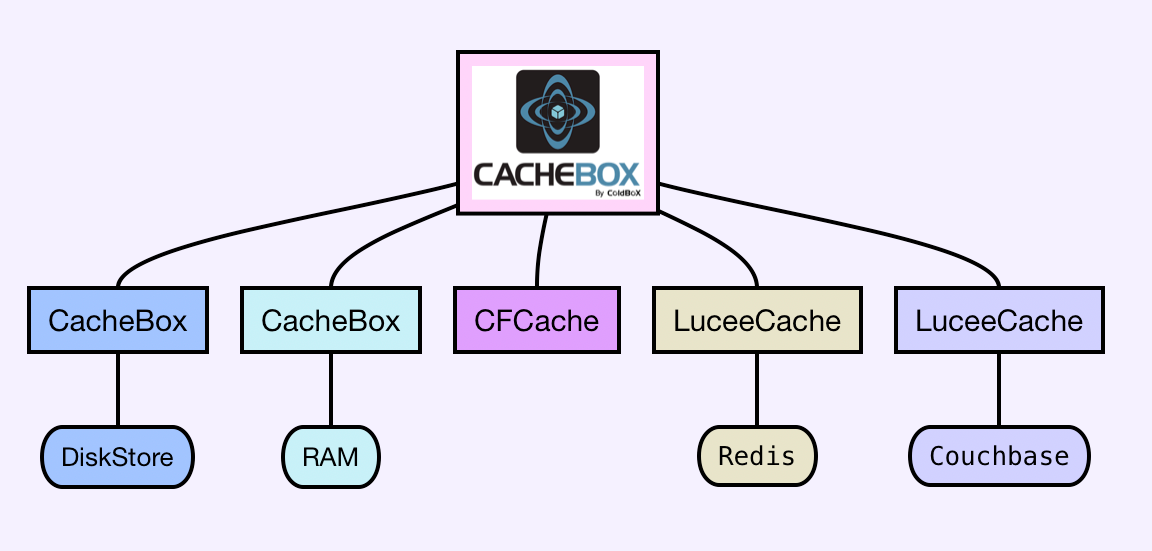
CacheBox is a cache aggregator, in which you can aggregate different caching engines or types of the same engine into one single umbrella. It gives you built in logging (via LogBox), an event model, synchronization, shutdown/startup procedures, reporting, interaction consoles and best of all a cache agnostic API.
CacheBox is a standalone framework for ColdFusion (CFML) applications and it is also bundled with the ColdBox Platform.
Versioning
CacheBox is maintained under the guidelines as much as possible. Releases will be numbered with the following format:
And constructed with the following guidelines:
Breaking backward compatibility bumps the major (and resets the minor and patch)
New additions without breaking backward compatibility bumps the minor (and resets the patch)
Bug fixes and misc changes bumps the patch
License
The ColdBox Platform, CacheBox is open source and licensed under the License.
Copyright by Ortus Solutions, Corp
ColdBox, CacheBox, Wirebox, LogBox are registered trademarks by Ortus Solutions, Corp
Discussion & Help
The Box products help and discussion groups can be found here:
Reporting a Bug
We all make mistakes from time to time :) So why not let us know about it and help us out. We also love pull requests, so please star us and fork us:
Jira Issue Tracking
Professional Open Source
ColdBox is a professional open source software backed by offering services like:
Custom Development
Professional Support & Mentoring
Training
Resources
Official Site:
CFCasts Video Training:
Source Code:
HONOR GOES TO GOD ABOVE ALL
Because of His grace, this project exists. If you don't like this, then don't read it, its not for you.
"Therefore being justified by **faith**, we have peace with God through our Lord Jesus Christ: By whom also we have access by **faith** into this **grace** wherein we stand, and rejoice in hope of the glory of God." Romans 5:5
The best way to contribute to WireBoxHola amigo! I'm excited that you are interested in contributing to ColdBox, CacheBox, LogBox, and/or WireBox. Before submitting your contribution, please make sure to take a moment and read through the following guidelines:
Code Of Conduct
This project is open source, and as such, the maintainers give their free time to build and maintain the source code held within. They make the code freely available in the hope that it will be of use to other developers and/or businesses. Please be considerate towards maintainers when raising issues or presenting pull requests. We all follow the Golden Rule: Do to others as you want them to do to you.
As contributors and maintainers of this project, we pledge to respect all people who contribute through reporting issues, posting feature requests, updating documentation, submitting pull requests or patches, and other activities.
Participants will be tolerant of opposing views.
Examples of unacceptable behavior by participants include the use of sexual language or imagery, derogatory comments or personal attacks, trolling, public or private harassment, insults, or other unprofessional conduct.
Bug Reporting
Each of the main standalone frameworks in ColdBox has separate locations for submitting bug reports. Please also ensure that if you submit a pull request, you link it to the appropriate issue.
ColdBox Core:
CacheBox :
LogBox :
If you file a bug report, your issue should contain a title, a clear description of the issue, a way to replicate the issue, and any support files we might need to replicate your issue. The goal of a bug report is to make it easy for yourself - and others - to replicate the bug and develop a fix for it. All issues that do not contain a way to replicate will not be addressed.
Support Questions
If you have questions about usage, professional support, or just ideas to bounce off the maintainers, please do not create an issue. Leverage our support channels first.
Ortus Community Discourse:
Box Slack Team:
Professional Support:
Pull Request Guidelines
The master branch is just a snapshot of the latest stable release. All development should be done in dedicated branches. Do not submit PRs against the master branch. They will be closed.
All pull requests should be sent against the development branch or the LTS version branch releases/v{version}
Security Vulnerabilities
If you discover a security vulnerability, please email the development team at and make sure you report it to the #security channel in our Box Team Slack Channel. All security vulnerabilities will be promptly addressed.
Development Setup
We have added all the necessary information to develop on ColdBox in our area and our so you can set up the database to test against.
Language Compatibility
Please make sure your code runs on the following Supported CFML Engines:
Lucee 5+
Adobe ColdFusion 2018+
Coding Styles & Formatting
We are big on coding styles and have included a .cfformat.json in the root of the project so that you can run the formatting tools and CommandBox scripts:# Format everythingbox run-script format# Start a watcher, type away, save and auto-format for youbox run-script format:watchWe recommend that anytime you hack on the core, you start the format watcher (box run-script format:watch). This will monitor your changes and auto-format your code for you.You can also see the Ortus Coding Standards you must follow here: https://github.com/Ortus-Solutions/coding-standards.
CFC Docs With DocBox
All CFCs are self-documenting, and we leverage to document the entire software. All functions must be properly documented using the DocBox syntax: https://docbox.ortusbooks.com/getting-started/annotating-your-code
Financial Contributions
You can support ColdBox and all of our Open Source initiatives at Ortus Solutions by becoming a Patreon. You can also get lots of goodies and services depending on the level of contributions.
Contributors
Thank you to all the people who have already contributed to ColdBox! We: heart: : heart: : heart: love you!
!
Made with
Cache Cleanup/Reaping
If you are using CacheBox within a ColdBox application, ColdBox is in charge of emitting reaping or cleanup requests to the CacheBox factory. However, if you are using the standalone version of the cache, then you will need to emit this command yourself in the desired execution point. We would suggest to do this on every request. This does not mean that the request executes every time, it means that the trigger is made and if the reaping time has been elapsed, then the caches clean themselves (CacheBox Providers Only!):
That's it! Just call on the reapAll() method and this will make sure that your caches clean themselves according to the reaping frequency selected in your configuration file.
Info: Reaping frequency and cleanup only applies to the CacheBox Provider.
Couchbase Providers
Ortus Couchbase Extension
, the makers of CacheBox, have created a commercial extension for the open source CFML engines Railo and Lucee to support caching distribution features via Couchbase ().
The Ortus Couchbase Extension is a Railo Server Extension that allows your server to natively connect to a Couchbase NoSQL Server cluster and leverage it for built-in caching, session/client storage and distribution, and much more. With our extension you will be able to scale and extend your Railo CFML applications with ease.
Upgrading to CacheBox 7
The official CacheBox 7 upgrade guide
ColdFusion 2016 Support Dropped
ColdFusion 2016 support has been dropped. Adobe doesn't support them anymore, so neither do we.
CacheBox Event Model
CacheBox also sports a very nice event model that can announce several cache life cycle events and factory life cycle events. You can listen to these events and interact with caches at runtime very easily, whether you are in standalone mode or within a ColdBox application.
Of course, if you are within a ColdBox application, you get the benefit of all the potential of ColdBox Interceptors and if you are in standalone mode, well, you just get the listener and that's it.
Each event execution also comes with a structure of name-value pairs called interceptData that can contain objects, variables and all kinds of data that can be useful for listeners to use. This data is sent by the event caller and each event caller decides what this data sent is.
ICacheStats
class : cachebox.system.cache.util.ICacheStats
This interface is the contract for statistics reporting. This is how CacheBox can produce gorgeous charting and reporting based on the implementation of this class.
BlackholeStore
The BlackholeStore is not something you would actually deploy to a production site. The BlackholeStore is a development tool that simulates caching but never actually caches anything. This store can be useful to help tune an application as it can provide a solid baseline for how things would behave without caching. Anything set into a cache powered by the blackhole store will vanish into a blackhole. Anytime a lookup is performed it will appear is if that object has expired. Finally, if you actually try to get and object you will receive a null.
Properties
None
Mock Provider
This provider can be used for mocking capabilities in your unit tests or any kind of test you are performing. It keeps a simple localized cache inside of a local structure. It should definitely not used for any type of caching at all.
Properties
None
Cache Topologies
There are several cache topologies that you can benefit from and it all depends on your business requirements and scalability requirements. I will only mention four distinct approaches for caching. CacheBox at this point can support all caching topologies as the underlying caches can support them. However, at this point in time, the CacheBox caching provider only supports a single instance in-process approach.
IEvictionPolicy
class : cachebox.system.cache.policies.IEvictionPolicy
This is the contract for creating eviction policies for usage by the CacheBox cache provider.
IObjectStore
class : cachebox.system.cache.store.IObjectStore
A CacheBox cache provider uses the concept of an object store in order to, well, store its cached objects. This can be anything as we have created an interface that anybody can implement and create their own object storages. Just be aware that the CacheBox provider's eviction policies use certain methods for reporting and evictions that MUST be implemented.
AbstractEvictionPolicy
class : cachebox.system.cache.policies.AbstractEvictionPolicy
This is the abstract class that gives the magic to eviction policies under the CacheBox cache provider. It communicates with the internal object stores and asks for specific metadata in specific sorter orders so the policy can execute its algorithm. Our current algorithms are: LRU,LFU, and FIFO. However, you can very easily implement your own.
LogBox
class : cachebox.system.logging.LogBox
A reference to either a new instance of LogBox, if running in standalone mode, or a running LogBox instance via the running ColdBox application context.
IColdboxApplicationCache
class : cachebox.system.cache.IColdboxApplicationCache
This interface extends from the original cache provider interface and adds certain methods that MUST be implemented so the cache can work for ColdBox applications. This includes functionality to do event/view caching, clearing/expiring by certain regular expressions and reporting. So if you want to create your own cache implementation for ColdBox applications, then it must adhere to this contract.
cachebox.reapAll();
Project maintainers have the right and responsibility to remove, edit, or reject comments, commits, code, wiki edits, issues, and other contributions not aligned with this Code of Conduct. Project maintainers who do not follow the Code of Conduct may be removed from the project team.
When interpreting the words and actions of others, participants should always assume good intentions. Emotions cannot be derived from textual representations.
Instances of abusive, harassing, or otherwise unacceptable behavior may be reported by opening an issue or contacting one or more of the project maintainers.
The full release notes per library can be found below. Just click on the library tab and explore their release notes:
Bug
Intermittent Exception from MetadataIndexer
Improvement
Come up with better default serialization for exception objects on LogEvents
New Feature
CacheBox Object Stores
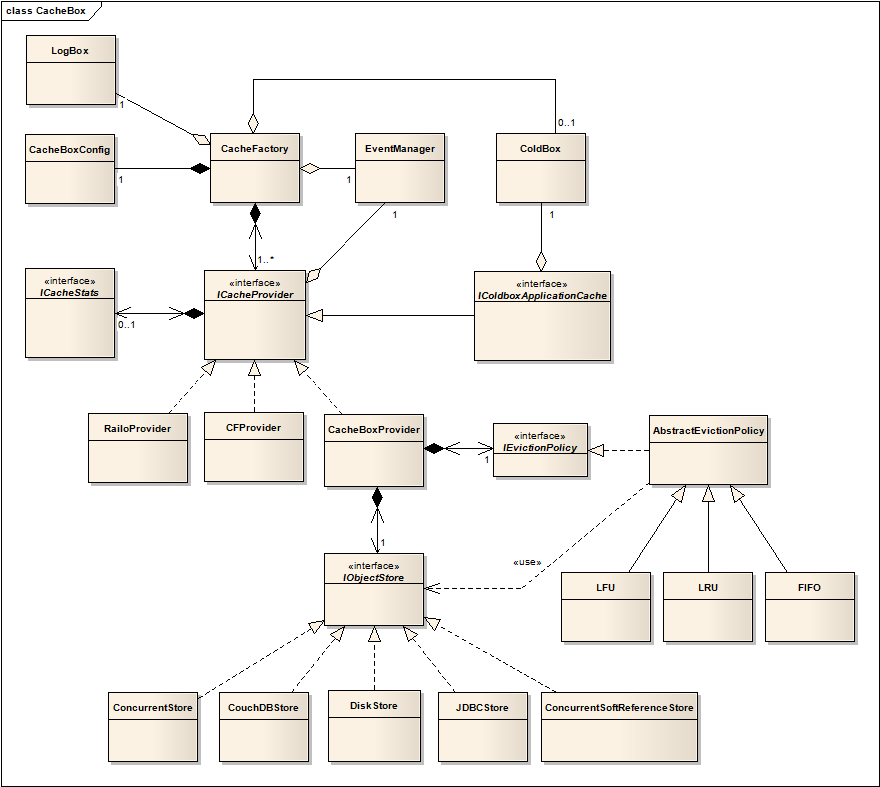
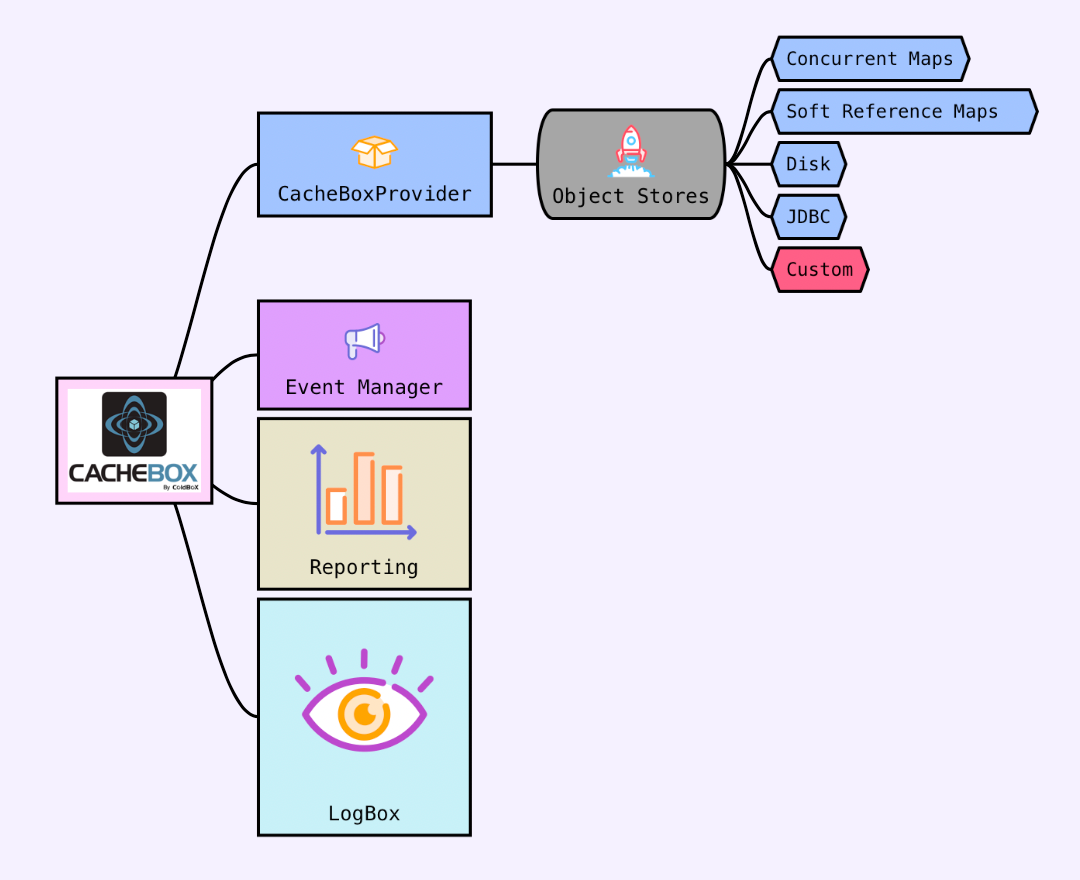
CacheBox offers the capability of object stores that can be used to store cached objects. If you look at the following figure you will understand our object model for our object stores:
Each object store is composed into a CacheBox provider for usage of storing and retrieving cached objects. The design principle behind each object store is that each object store implements its own locking, serialization, reading and writing mechanisms that are fronted by a nice API via the CacheBoxProvider object. Also, it is very important to note that the CacheBox eviction policies talk to the object stores in order to get ordered data structures for eviction purposes.
So if you will be creating your own object stores, make sure they implement the right data methods the eviction policies can use for evictions. The CacheBox provider's reaping methods use the object stores in order to get metadata out of the object stores in order to take care of cleanup, expirations and evictions. We definitely encourage you to take a look at the written object store implementations in order to learn how this works.
So let's start investigating each of the object stores that are shipped with CacheBox.
Caution Please note that each object store can have extra properties that need to be set in your cache configuration file.
CacheBoxConfig
class : cachebox.system.cache.config.CacheBoxConfig
This is the required configuration object the CacheFactory object needs in order to start itself up. This configuration object can be created and then used to configure all your caches, listeners, scope registrations and logging. We will investigate all the types of configurations available but they all translate down to methods in this configuration object. Ways to configure CacheBox:
Programmatically via method calls
Programmatically via a CacheBox DSL or a CacheBox DSL CFC
What's New With 7.2.0
November 18, 2023
You can read all about this release on our main What's New Page:
Release Notes
The full release notes per library can be found below. Just click on the library tab and explore their release notes:
Author
Luis Fernando Majano Lainez
Luis Majano is a Computer Engineer, published author, founder, and CEO of Ortus Solutions, Corp (), a consulting firm specializing in open-sourcing tooling, web development, architecture, and professional open-source.
He has been designing and working with software architecture and technologies since the year 2000. He has a passion for learning and mentoring developers so they can succeed with sustainable software practices and the usage and development of open-source software.
JDBCStore
The JDBCStore is a nice object storage that leverages a single database table to keep track of its objects. This is great for simple or small scale clusters that need centralized caching. It also follows suit that complex objects are serialized into the tables and simple objects are just saved. The object store can even create the database table for you if need be via its own object store custom properties.
Properties
Key
Type
ConcurrentSoftReferenceStore
The ConcurrentSoftReferenceStore uses a combination of concurrency maps and java soft references. In our introductory sections we introduced java soft references and how it allows us to create placeholders in memory for objects and when the JVM needs memory it has permission to collect these placeholders and thus release memory. This is truly a great combination to have and ColdBox leverages this for its template, event and view fragment caching.
Just remember that when you use this object storage, the time spans are never guaranteed as the JVM has permission to cleanup objects when it sees fit. To get much better performance on the JVM memory heap space and a more active memory, we recommend using this object storage. Research has also indicated that a combination of memory sensitive structures in combination with limits in a cache, can increase performance and optimize its usage. So please make sure limits are set in the cache.
Replicated
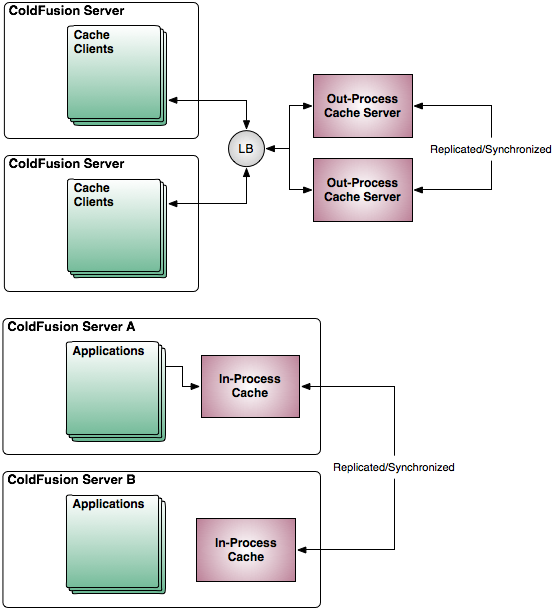
A replicated cache can exist in multiple application server machines and their contents will be replicated, meaning all caches will contain all the data elements. This type of topology is beneficial as it allows for all members in the application cluster to have availability to its elements. However, there are also some drawbacks due to the amount of chatter and synchronization that must exist in order for all data or cache nodes to have the same data fresh. This approach will provide better scalability and redundancy as you are not limited to one single point of failure. This replicated cache can be in-process or out-process depending on the caching engine you are using.
Benefits:
Caching Concepts
"A cache (pronounced /'kæ?/ kash) is a component that improves performance by transparently storing data such that future requests for that data can be served faster"
Wikipedia
Caching is everywhere around us these days in all shapes and forms: query caching, data caching, page fragment caching, event caching, etc. Much like how in :)
In its most basic form, we use caching to accelerate and scale our processes. We might have a certain request that takes time to process due to let’s say in colloquial terms "a big ass query". We can leverage caching by slapping that query up and placing it in cache so we don't have to wait for it again. Our process now only at most take 1 big hit and then can be merrily on their way serving requests. Again, this is a very practical approach to caching. As you will see from this guide, caching can get very very complex and you need the right tools to be able to scale out, configure and tune your caching approaches.
When building enterprise class applications we are faced with many problems dealing with architecture, performance, scalability and so much more. One of these issues might be dealing with expensive queries, but there are also lots of other issues to consider like: expense of object creation/configuration, data retrieval, data/system availability, page output caching, etc. All of these issues can benefit from some kind of caching in order to optimize performance, availability and scalability.
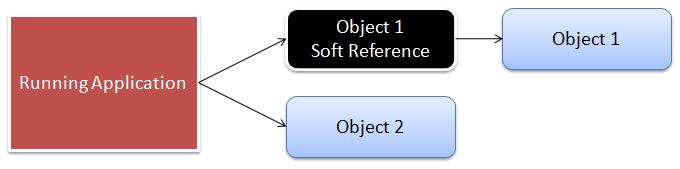
Java Soft References
"In the past, developers didn't have much control over garbage collection or memory management. Java2 has changed that by introducing the java.lang.ref package. The abstract base class Reference is inherited by classes SoftReference, WeakReference and PhantomReference. SoftReferences are well suited for use in applications needing to perform caching."
Why is this? Well, a soft reference is nothing but a wrapper class that wraps an object in memory. Whenever the JVM requires memory and runs its reference rules, it can detect these soft references and decide to purge them if it meets the garbage collector rules. If it purges them, the wrapped object inside of the soft reference is marked for collection, but the java soft reference itself still exists. Therefore, the programmer can determine if the object inside the reference exists or not. If it does not exist, it means the object was garbage collected and I have no more object. I won't go into the implementation semantics of the cache, just theory. Please visit the references to understand more of how the ColdBox cache was built.
In summary, soft references are what determine if an object is still available or not. CacheBox cache can then run maintenance on itself and clean out all of its references for you if you are using the ConcurrentSoftReferenceStore
Installing CacheBox
CacheBox can be installed as a standalone framework or included with the latest ColdBox Platform release, so it is unnecessary if you are within a ColdBox application.
System Requirements
Adobe ColdFusion 2018+
Creating Your Own Skins
Creating Your Own Skins
CacheBox also allows for the creation of reporting skins so you can create gorgeous looking reports for its caches, configurations, content, etc. The location of such skins is in the following location:
The name of the folder inside of the skins folder is the unique name used to specify the skin in the custom tag. You can look at the default skin to learn from it and see how you can build skins yourself.
EventManager
class : cachebox.system.core.events.EventPoolManager or coldbox.system.web.services.InterceptorService
If you are in standalone mode then CacheBox configures its own internal event manager that is very similar to the ColdBox . This event manager keeps track of the listeners for each of the interceptions points or events that are broadcasted by CacheBox and its providers.
A reference to a running ColdBox application context the CacheBox instance is running under. This will be null if running in standalone mode. However, if you are within a ColdBox application, the CacheProvider and its references can access anything within the running ColdBox application.
config = new cachebox.system.cache.config.CacheBoxConfig();
cachebox = new cachebox.system.cache.CacheFactory( config );
Skin Attributes
A skin receives attributes or configuration elements via the custom tag used for the report monitor. Basically any attribute you add to the custom tag will be available in the skin's pages in a structure called attributes, makes sense huh?
Tag Caller
A skin also receives a reference to the caller scope via a variable called, drum roll please, caller. So you can also reference the caller variables via this scope.
/cachebox/system/cache/report/skins
ICacheProvider
class : cachebox.system.cache.ICacheProvider
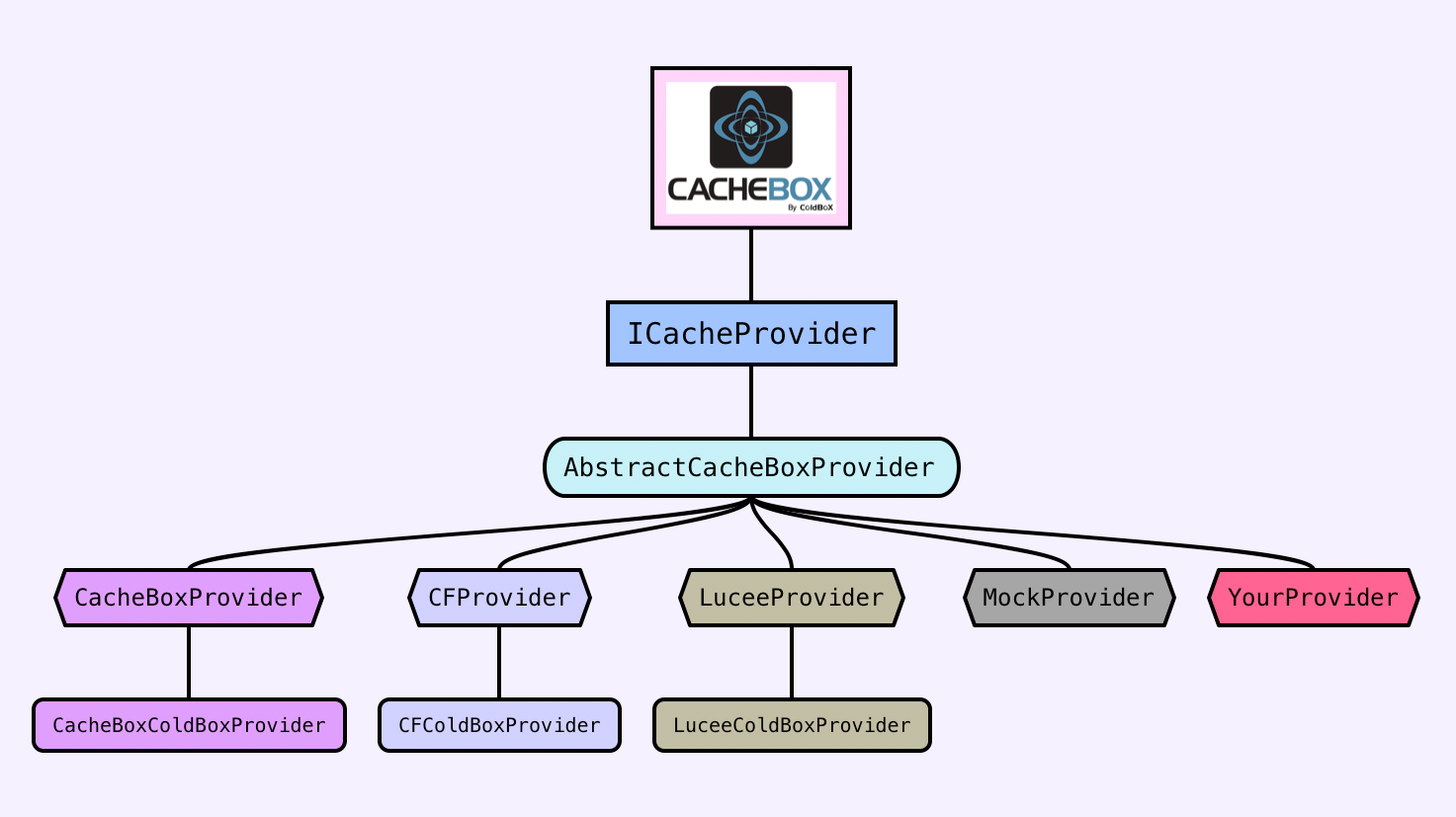
This is the main interface that each caching engine implementation must implement in order for CacheBox to aggregate it and use it. Each implementation can add additional functionality and methods but this is the core contract that each provider must adhere to. CacheBox aggregates 1 or more instances of CacheProviders that implement this interface. You can find all of our CacheBox cache providers in the following location:
/cachebox/system/cache/providers
CacheFactory
class : cachebox.system.cache.CacheFactory
The CacheFactory object is the most important object as it represents CacheBox. The class path for this object is coldbox.system.cache.CacheFactory or in standalone mode cachebox.system.cache.CacheFactory.
This is the aggregator or cache overseer that you will interact with to get caches, shutdown caches, perform global cache operations, and startup your CacheBox instance. If you are using CacheBox within a ColdBox application context, then ColdBox does all the configurations and creations for you. It even links your ColdBox context, LogBox and ColdBox Intercepting service for you.
cachebox = new cachebox.system.cache.CacheFactory();
Lucee 5+
Standalone Installation
You can leverage CommandBox to install the standalone version of CacheBox with a simple command:
This will install CacheBox as a dependency in your application into a folder called cachebox. You can then leverage the standalone namespace within your application: cachebox.system.ioc.
Mappings
You will need the following mapping that points to the folder you installed cachebox into:
This will ensure that the appropriate libraries can find each other.
Remember that this only applies to the standalone approach.
He is the creator of ColdBox HMVC, ContentBox Modular CMS, TestBox BDD, CommandBox CLI, and over 200 open-source projects. He speaks regularly at several international conferences, and you can read his blog at www.luismajano.com.
Luis is passionate about Jesus, tennis, golf, volleyball, and anything electronic. Random Author Facts:
He played volleyball in the Salvadorean National Team at the tender age of 17
The Lord of the Rings and The Hobbit is something he reads every 5 years. (Geek!)
His first computer was a Texas Instrument TI-99/4A that his parents gave him in 1986. After some time digesting his very first BASIC book, he had written his own tic-tac-toe game at the age of 9. (Extra geek!)
He has a geek love for circuits, microcontrollers, and overall embedded systems.
He has of late become a fan of running and bike riding with his family.
Keep Jesus number one in your life and in your heart. I did and it changed my life from desolation, defeat and failure to an abundant life full of love, thankfulness, joy and overwhelming peace. As this world breathes failure and fear upon any life, Jesus brings power, love and a sound mind to everybody!
“Trust in the LORD with all your heart, and do not lean on your own understanding.” – Proverbs 3:5
Contributors
Jorge Emilio Reyes Bendeck
Jorge is an Industrial and Systems Engineer born in El Salvador. After finishing his Bachelor studies at the Monterrey Institute of Technology and Higher Education ITESM, Mexico, he went back to his home country where he worked as the COO of Industrias Bendek S.A.. In 2012 he left El Salvador and moved to Switzerland in pursuit of the love of his life. He married her and today he resides in Basel with his lovely wife Marta and their daughter Sofía.
Jorge started working as project manager and business developer at Ortus Solutions, Corp. in 2013, . At Ortus he fell in love with software development and now enjoys taking part on software development projects and software documentation! He is a fellow Christian who loves to play the guitar, worship and rejoice in the Lord!
Therefore, if anyone is in Christ, the new creation has come: The old has gone, the new is here!
2 Corinthians 5:17
Brad Wood
Brad grew up in southern Missouri where he systematically disassembled every toy he ever owned which occasionally led to unintentional shock therapy (TVs hold charge long after they've been unplugged, you know) After high school he majored in Computer Science with a music minor at MidAmerica Nazarene University (Olathe, KS). Today he lives in Kansas City with his wife and three girls where he still disassembles most of his belongings (including automobiles) just with a slightly higher success rate of putting them back together again.) Brad enjoys church, all sorts of international food, and the great outdoors.
Brad has been programming CFML for 12+ years and has used every version of CF since 4.5. He first fell in love with ColdFusion as a way to easily connect a database to his website for dynamic pages. Brad blogs at (http://www.codersrevolution.com) and likes to work on solder-at-home digital and analog circuits with his daughter as well as building projects with Arduino-based microcontrollers.
Adobe ColdFusion (ACF) engines require all queryExecute() statements running within a transaction to have identical datasource, username, and password options. If your application uses the JDBCStore within a <cftransaction> block you may receive the following error message "Usernames and Passwords for all the database tags within the cftransaction tag must be the same". If your application sets the default DSN using this.datasource in your Application.cfc file, you may be able to work around the issue by omitting the dsn, dsnUsername, and dsnPassword properties from the JDBCStore.
Properties
None
You can also find some great research out there about concurrency maps and soft references:
Wirebox is maintained under the Semantic Versioning guidelines as much as possible. Releases will be numbered in the following format:
And constructed with the following guidelines:
Breaking backward compatibility bumps the major (and resets the minor and patch)
New additions without breaking backward compatibility bump the minor (and resets the patch)
Bug fixes and misc changes bump the patch
LTS - Support Policy
Updates are provided for 12 months for all releases, and security fixes are provided for two years after the next major release.
Version
Release
Updates
Security Fixes
Releases
In this section, you will find the release notes for each version we release under this major version. If you are looking for the release notes of previous major versions, use the version switcher at the top left of this documentation book. Here is a breakdown of our major version releases.
Version 7.0 - May 2023
About This Book
The source code for this book is hosted in GitHub: https://github.com/ortus-docs/wirebox-docs. You can freely contribute to it and submit pull requests. The contents of this book is copyright by Ortus Solutions, Corp and cannot be altered or reproduced without author's consent. All content is provided "As-Is" and can be freely distributed.
The majority of code examples in this book are done in cfscript.
The majority of code generation and running of examples are done via CommandBox: The ColdFusion (CFML) CLI, Package Manager, REPL -
All ColdFusion examples designed to run on the open source Lucee Platform or Adobe ColdFusion 11+
External Trademarks & Copyrights
Flash, Flex, ColdFusion, and Adobe are registered trademarks and copyrights of Adobe Systems, Inc.
Notice of Liability
The information in this book is distributed “as is”, without warranty. The author and Ortus Solutions, Corp shall not have any liability to any person or entity with respect to loss or damage caused or alleged to be caused directly or indirectly by the content of this training book, software and resources described in it.
Contributing
We highly encourage contribution to this book and our open source software. The source code for this book can be found in our where you can submit pull requests.
Charitable Proceeds
10% of the proceeds of this book will go to charity to support orphaned kids in El Salvador - . So please donate and purchase the printed version of this book, every book sold can help a child for almost 2 months.
Shalom Children's Home
Shalom Children’s Home () is one of the ministries that is dear to our hearts located in El Salvador. During the 12 year civil war that ended in 1990, many children were left orphaned or abandoned by parents who fled El Salvador. The Benners saw the need to help these children and received 13 children in 1982. Little by little, more children came on their own, churches and the government brought children to them for care, and the Shalom Children’s Home was founded.
Shalom now cares for over 80 children in El Salvador, from newborns to 18 years old. They receive shelter, clothing, food, medical care, education and life skills training in a Christian environment. The home is supported by a child sponsorship program.
We have personally supported Shalom for over 6 years now; it is a place of blessing for many children in El Salvador that either have no families or have been abandoned. This is good earth to seed and plant.
ColdBox Configuration
Default Configuration
The default configuration file for CacheBox within ColdBox applications can be found here
This configuration file configures CacheBox with two caches:
default
template
The default cache can be used for any type of data caching or object persistence. The template cache is used for event caching and view fragment caching. It is also important to note that the template cache uses the ConcurrentSoftReferenceStore for its objects and the default cache uses the ConcurrentStore for its objects.
This means that event/view caching is subject to available memory via the JVM, a memory sensitive cache. This is essential as you could have lots of events being cached and you want to be considerate with memory concerns. It is also limited to 300 objects.
Now, this is all nice and dandy, but what if I want to configure CacheBox "MY WAY!!"? Well, don't shout, we are just getting there. There are several ways you can configure CacheBox from within your applications, so chose wisely.
Custom Configuration
ColdBox allows for a programmatic approach via the ColdBox configuration object: Coldbox.cfc. So let's look at how the framework loader looks at your configuration for CacheBox configuration details:
Is there a cachebox DSL variable defined in the configuration structure?
False:
Does a CacheBox.cfc
Info The configuration DSL is exactly the same as you have seen in before with the only distinction that you can add a configFile key that can point to an external configuration CFC.
That's it folks! You can either write inline CacheBox DSL configuration, use by convention a CacheBox.cfc data CFC or use a configFile approach for external file loading. Pick your poison!
Skin Templates
The first step of creating skin templates is to create its holding folder inside of the skins directory. So if we were starting a new skin called goodness then you would create a new folder in the following directory:
/cachebox/system/cache/report/skins/goodness
The following templates are the ones you will be skinning and placing in this folder. In all reality you could potentially just have one, CachePanel.cfm. However, since you can bring in AJAX content to refresh certain parts of the panel, you break out its reporting functionality into various templates. The CFC in charge of rendering your skin templates is the ReportHandler.cfc located in the same report package, so we recommend also reading its API for more in depth information. So let's explore them:
Template
Info : All skins are rendered within the ReportHandler component. This means that you have access to this object's methods and local variables. We recommend you look at the default skin's templates for usage.
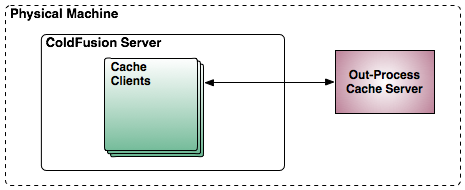
Single Instance/Out-Process
A single instance can be an out-process cache that leaves on its own JVM typically in the same machine as the application server. This approach has also its benefits and cons. A typical example of an out of process cache can be using an instance of CouchDB for storage of your cache components and your applications talk to the cache via REST.
Benefits:
Still access is fast as it is in the same machine
Easy to setup and configure
Might require a windows or *nix service so the cache engine starts up with the machine
Can leverage its own JVM heap, memory, GC, etc and have more granularities.
Out of process cache servers can be clustered also to provide you with better redundancy. However, once you start clustering them, each of those servers will need a way to replicate and synchronize each other.
Cons:
Still shares resources in the server
Limited scalability
Needs startup scripts
CacheBox Architecture
CacheBox is architected to act as a cache aggregator but also has its own cache implementation based on a hybrid of ColdFusion and Java. Let's investigate first of all the major classes that make up CacheBox.
ConcurrentStore
The ConcurrentStore is an object store that uses concurrent hash maps provided by the Sun JDK. Concurrent maps are better suited for caching algorithms as they do not lock the entire map in order to access elements. They work on the concept of row locking. Therefore, the increased performance and increase in throughput is observable by using concurrency maps. Here is a quote from the Java Docs:
"However, even though all operations are thread-safe, retrieval operations do not entail locking, and there is not any support for locking the entire table in a way that prevents all access. Retrieval operations (including get) generally do not block, so may overlap with update operations (including put and remove). Retrievals reflect the results of the most recently completed update operations holding upon their onset."
Java Docs
Properties
None
You can also find some great research out there about concurrency maps:
Lucee Providers
Our LuceeProvider is an implementation specifically written for Lucee
Properties
CacheBox Eviction Policies
The CacheBox Provider offers several eviction policies that are used to evict objects from cache when certain situations occur within the cache environment. Again, these eviction policies are only for the CacheBox Cache provider. These eviction situations can include:
Maximum objects reached
JVM memory threshold reached
Provider Events
Each cache provider has the potential of announcing life cycle events as it implements it. If you are a cache provider author, then you can use the aggregated EventManager to register, process and announce events a-la-carte. So let's investigate each provider's life cycle events:
CacheBoxProvider-CacheBoxColdBoxProvider Events
Common CacheFactory Methods
Here is a list of some of the most common methods you can use to interact with CacheBox. For full details, please view the online
addCache(any<ICacheProvider> cache)
Register a new instantiated cache with this cache factory
Cache Providers
We have shipped CacheBox with several CacheBox providers that you can use in your applications. There are basically two modes of operation for a CacheBox provider and it is all determined by the interface they implement:
ICacheProvider : A standalone cache provider
IColdboxApplicationCache : A cache provider for usage by the ColdBox Framework
Distributed
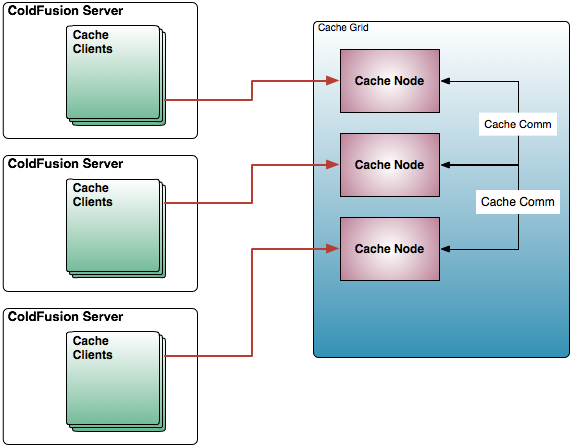
Distributed caching is the big daddy of scalability and extensibility. The crux concept is of partitioning the cache data across the members of the cache cluster and creating a grid of cached data that can scale rather easily. There are several major players out there like with Terracotta, , and our favorite: .
I suggest looking at all options to find what best suits your requirements. Please note that each vendor has their own flavor of distributed caching and might not match our diagram. Our diagram is just a visual representation for knowledge purposes.
CacheBox Config Object
The previous CacheBox DSL is a great way to configure CacheBox as it is very portable. However, you can also configure CacheBox by calling methods on the CacheBoxConfig object, which is exactly what we do when we read the CacheBox DSL.
Below are the main methods used for configuring CacheBox which match exactly to the DSL items, so please refer to the DSL items for definitions and settings. Also, for all the methods in this object, check out the
init([any CFCConfig], [string CFCConfigPath])
The constructor
DiskStore
The DiskStore as its name implies, uses a disk to store cached objects under. This can be any location that can be accessible via cffile and cfdirectory. Therefore, you can use Adobe ColdFusion/Lucee resources or virtual RAM locations or even Amazon S3. You can get funky my friends!
Anyways, this storage will look at the incoming target object to cache and if it is a complex object it will serialize to binary and store it on disk. If it is a simple value, it just saves it. This is a great way to provide a centralized template/view caching mechanisms as views are simple strings. You can even connect a farm of servers to talk to a centralized network drive that has centralized view/event template storage. Anyways, you can get funky!
Caching Considerations
Whenever you are leveraging the power of caching, we recommend that you also take into consideration several key factors that need to be evaluated and put into practice in your applications. Below are some key factors that we recommend:
Thread Safety : Take into consideration that when you cache data/objects or whatever, multiple threads will be trying to access it in your application. Make sure that you have the appropriate locking and synchronization techniques so multiple threads don't interfere with one another. This might be from simple testing procedures to make sure an element exists, to a more strict approach where you create a cache decorator that does hard blocks on cache access via named locks. Don't ever assume that what you ask from the cache actually exists.
<major>.<minor>.<patch>
/coldbox/system/web/config/CacheBox.cfc
Manual eviction executions
Below is a refresher on what an eviction policy means:
Eviction Policy: The algorithm that decides what element(s) will be evicted from a cache when full or a certain criteria has been met in the cache. (Cache Algorithms)
Please note that when a cache element is evicted from the cache it usually is expired first so it can be gracefully collected when the CacheBox reaping procedures occur. Therefore, you might see sometimes that the cache actually goes above the maximum objects defined, this is normal.
Caution Please note that no eternal objects are ever evicted from the CacheBox provider. Eternal objects live as long as the CacheBox instance lives for (most likely application scope timeout). So please take that into consideration.
ColdBox ships with the following eviction policies:
Policy
Description
LRU (Least Recently Used)
With this eviction policy, the cache discards the least recently used items first. This is the default policy
LFU (Least Frequently Used)
This policy counts how often an item has been accessed and it will discard the items that have been used the least.
FIFO (First In First Out)
Just like it sounds, first one in, first one out. Great for implementing sized queues
LIFO (Last In First Out)
Just like it sounds, last one in, first one out. Great for implementing sized stacks or timed stacks
dsnPassword
string
false
The DSN password if used
tableAutoCreate
Boolean
false
true
The object store can create the repository table for you if need be and if it does not exist.
Required
Description
cachebox.js
true
The JavaScript file that will be automatically loaded into the header content via a cfhtmlhead call. You can put any JavaScript you like here or load more JavaScript files via your skin templates.
cachebox.css
true
The css file that will be automatically loaded into the header content via a cfhtmlhead call.
CachePanel.cfm
true
The main template that displays the report monitor to the user. This skin could potentially hold action buttons and other parts of the cache report rendered in specific locations by using rendering methods (see ReportHandler section).
CacheReport.cfm
false
This template is usually rendered via the renderCacheReport(cacheName) method and it is supposed to render out a report of the cache provider using the incoming cacheName argument. This template usually has a call somewhere for the content report of such cache provider via the renderCacheContentReport(cacheName) method.
CacheContentReport.cfm
false
This template is usually rendered via the renderCacheContentReport(cacheName) method and it is supposed to render out a report of the contents of the cache provider using the incoming cacheName argument. This table of contents can also have action buttons assigned to them.
Cache Hit : An event that occurs when an element requested from cache is found in the cache.
Cache Miss : An event that occurs when an element requested from cache is NOT found in the cache.
Eviction : The act of removing an element from the cache due to certain criteria algorithm that directly is connected to the state of the element.
Eviction Policy : The algorithm that decides what element(s) will be evicted from a cache when full or a certain criteria has been met in the cache. (Cache Algorithms)
LRU : An eviction policy that discards the least recently used items first.
LFU : An eviction policy that counts how often an item has been accessed and it will discard the items that have been used the least.
FIFO : An eviction policy that works as a queue, first object in will be the first object out of the cache. So older staler objects are purged.
Cache Provider : A concrete implementation to a caching engine within CacheBox
Object Store : An object that stores cached elements and indexes them
Idle or Last Access Timeout : An expiration time an element receives if it is not accessed.
Reap : Usually an asynchronous event that cleans a cache from dead elements or expired elements
Distributed/Partitioned Cache : A form of caching that allows the cache to span multiple servers so that it can grow in size and in capacity. Each machine contains a unique partition of the dataset. Adding machines to the cluster will increase the capacity of the cache. Both read and write access involve network transfer and serialization/deserialization.
Near Cache : Each cache server contains a small local cache which is synchronized with a larger distributed/partitioned cache, optimizing read performance. There is some overhead involved with synchronizing the caches.
Replicated : Each cache server contains a full copy of the elements cached
In Process Cache : A cache that lives inside of the same heap as the application using it.
Out of Process Cache : A cache that lives as its own process and heap in the most likely the same server as the application using it.
Eternal Objects : Eternal objects are objects that will never be purged or evicted by the caching engine automatically. The only way to remove them is to recreate the cache or clear them manually.
Cache Topology : A concept that refers to where data physically resides and how it is accessed in a distributed environment
The named cache to talk to via Lucee cache operations. By default we talk to the default Lucee object cache.
Property
Type
Required
Default
Description
afterCacheElementUpdated
cache: the cache provider
cacheNewObject: the new object to cache
cacheOldObject: the object replaced
Called via a set() operation when there is already the same key in the cache. Called before the replacement occurs
afterCacheElementInsert
cache: the cache provider
cacheObject: the new object to cache
cacheObjectKey: the key used to store the object
cacheObjectTimeout: the timeout used
cacheObjectLastAccessTimeout:the last access timeout used
Called after a new cache element has been inserted into the cache
afterCacheElementRemoved
cache: the cache provdier
cacheObjectKey: the key of the removed object
Called after a cache element has been removed from the cache
afterCacheClearAll
cache: the cache provider
Called after a clearAll() has been issued on the cache
afterCacheElementExpired
cache: the cache provider
cacheObjectKey: the key of the expired object
Called after a cache element has been expired from the cache
CFProvider-CFColdboxProvider Events
Event
Data
Description
afterCacheElementInsert
cache: the cache provider
cacheObject: the new object to cache
cacheObjectKey: the key used to store the object
cacheObjectTimeout: the timeout used
cacheObjectLastAccessTimeout: the last access timeout used
Called after a new cache element has been inserted into the cache
afterCacheElementRemoved
cache: the cache provider
cacheObjectKey: the key of the removed object
Called after a cache element has been removed from the cache
afterCacheClearAll
cache: the cache provider
Called after a clearAll() has been issued on the cache
Event
Data
exist in the application's
config
folder?
True : Use that for configuration
False: Configure CacheBox with default framework settings found in /coldbox/system/web/config/CacheBox.cfc
True:
Have you defined a configFile key in the cacheBox DSL structure?
True: Then use that value to pass into the configuration object so it can load CacheBox using that configuration CFC
False: The configuration data (CacheBox DSL) is going to be defined inline here so use that structure for configuration
addDefaultCache(string name)
Add a default named cache to our registry, create it, config it, register it and return it of type: cachebox
clearAll()
Clears all the elements in all the registered caches without de-registrations
configure(CacheBoxConfig config)
Configure the cache factory for operation, called by the init()
expireAll()
Expires all the elements in all the registered caches without de-registrations
getCache(string name)
Get a reference to a registered cache in this factory
Replace a registered named cache with a new decorated cache of the same name
shutdown()
Recursively sends shutdown commands to all registered caches and cleans up in preparation for shutdown
Common Operation Examples
Info Remember that some of the CacheBox methods announce events. So please see our event model section to see what kind of events you can listen to when working with CacheBox.
// Add another default cache type but with the name FunkyCache
funkyCache = cachebox.addDefaultCache("FunkyCache");
// Add some elements to funky Cache
funkyCache.set("Myentry",now(),"20");

// Get a reference to a named cache
cfCache = cacheBox.getCache("CFCache");

// Get a reference to the default named cache
cache = cacheBox.getDefaultCache();

// Remove our funky cache no longer needed
cacheBox.removeCache("FunkyCache");

// Create a new cache a replace a cache, the MyFunkyFunkyCache implements ICacheProvider
newCache = new MyFunkyFunkyCache({maxObjects=200,timeout=30});
// replace the CFCache with this one
cacheBox.replaceCache( "CFCache", newCache );

// Add a new cache to cachebox programmatically
newCache = new MyFunkyFunkyCache("FunkynessCache", {maxObjects=200,timeout=30});
cacheBox.addCache( newCache );

// Send a shutdown command to cachebox
cachebox.shutdown();
Needs a client of some sort to be installed in the application server so it can function and a protocol to talk to it: RMI, JMS, SOAP, REST, etc.
Not fault tolerant
The following are the shipped providers:
Provider
ColdBox Enabled
Reporting Enabled
Description
CacheBoxProvider
false
true
Our very own CacheBox caching engine
CacheBoxColdBoxProvider
true
true
Our CacheBox caching engine prepared for ColdBox application usage
CFProvider
Each provider has the shared functionality provided by the ICacheProvider and IColdboxApplicationCache interfaces, so I encourage you to look at the CFC API Docs for an in-depth view of their API. Also, please note that each cache provider implementation has also some extra methods and functionality according to their implementation, so please check out the API docs for each provider.
The Ortus Couchbase Extension is a Lucee Server Extension that allows your server to natively connect to a Couchbase NoSQL Server cluster and leverage it for built-in caching, session/client storage and distribution, and much more. With our extension you will be able to scale and extend your Lucee CFML applications with ease.
The extension will enhance your Lucee server with some of the following capabilities:
Store session/client variables in a distributed Couchbase cluster
Get rid of sticky session load balancers, come to the round-robin world!
Session/client variable persistence even after restarts
Ability to leverage the RAM resource virtual file system as a cluster-wide file system
Cache connection capablities for providing distributed & highly scalable query, object, template, function caching
Benefits:
Extreme scalability
Cache data can survive server restarts if one goes down, better redundancy
Better cache availability through redundancy
Higher storage availability
Higher flexibility
Your storage increases as more cluster members are added
Cons:
Harder to configure and setup (Maybe, terracotta and ColdFusion 9 is super easy)
A flag that indicates if the store should use expandPath() to figure out the path to store objects in.
directoryPath
string
true
---
Serialization : If you will be caching to disk, database or using replication, distribution, most likely the caching engines will be serializing or converting your data and objects into byte or string format in order to persist them. Therefore, your objects must be able to support serialization and also be aware that if you are caching complex objects, those objects will be serialized alongside the target object. This is what's called an object graph. Where a serializer will go through the entire object graph (object/data relationships) of the target object and serialize everything. If you have circular references or references to tons of objects, serialization performance degrades and could potentially cause a heap overload and crash your application server as it will recurse forever. ColdFusion 9 introduced the component and property attribute called serializable, which is a boolean attribute you can add to the cfcomponent and cfproperty tags. We recommend using it and marking components and relationships that do NOT need serialization.
Caution The default value for the serializable attribute is true.
Data Format : Determine how you want to store data so it is easy to take that snapshot out of a cache and use. This can be from implementing object state/memento patterns, to leveraging serialization, to pre-defined data structures. Think ahead of HOW your data will be stored in the caches.
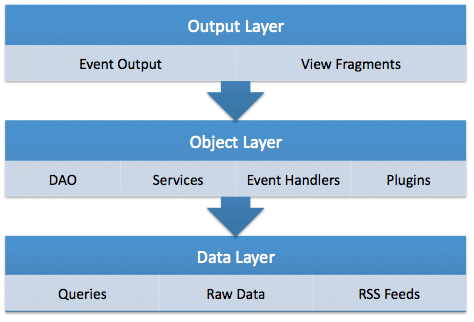
Cache Layers : In our experience, we have seen greater improvement in performance and scalability by planning caching layers. Caching layers is what are the different layers of caching your application will provide from data to objects to event and view fragments. We recommend you analyze your cache layers and plan how they will behave. A perfect live example of caching layers can be seen in our open source ColdFusion CMS, ContentBox Modular CMS. ContentBox leverages query caching, XML/Feed caching, object caching of DAO's, services, some business objects, plugins and event handlers, to view fragment caching and overall event output caching. We use it all baby!
Cache Limits : There are definite benefits of demarcating limits on your cache. This involves setting up default limits for timeouts, idle timeouts and maximum number of objects within a cache. Studies have shown that leverage memory sensitive data constructs with fixed limit caching parameters can increase performance and overall JVM stability. Look at our cache resources for these studies as they are very interesting.
We have already seen in our previous section all the events that are announced by CacheBox and its providers, but how do we listen?
There are two ways to build CacheBox listeners because there are two modes of operations, but the core is the same. Listeners are simple CFCs that must create methods that match the name of the event they want to listen in. If you are running CacheBox within a ColdBox application, listeners are Interceptors and you declare them and register them exactly the same way that you do with normal interceptors.
Also, these methods can take up to three parameters depending on your mode of operation (standalone or ColdBox). The one main difference between pure CacheBox listeners and ColdBox interceptors are that the configure method for the standalone CacheBox is different. Please see samples in this section.
Examples
So let's say that we want to listen on the beforeCacheFactoryShutdown and on the afterCacheElementRemoved event in our listener.
Coldbox Mode Listener
Standalone Mode Listener
Please note the configure() method in the standalone listener. This is necessary when you are using CacheBox listeners outside of a ColdBox application. The configure() method receives two parameters:
cacheBox : An instance reference to the CacheBox factory where this listener will be registered with.
properties : A structure of properties that passes through from the configuration file.
As you can see from the examples above, each Listener component can listen to multiple events. Now you might be asking yourself, in what order are these listeners executed in? Well, they are executed in the order they are declared in either the ColdBox configuration file as interceptors or the CacheBox configuration file as listeners.
Caution Order is EXTREMELY important for interceptors/listeners. So please make sure you order them in the declaration file in the order you want them to fire.
Action Commands
Each skin template can execute action commands. We have several already constructed into the tag that can execute if it detects an incoming URL variable called URL.cbox_command. So if your report exists in a page called monitor.cfm then just call that same page (via AJAX preferably) with some URL variables attached (See default skin example). Now, below are the ones we implement, but you can build as many as you like and place them in the page where you use the monitor tag or in the skin templates themselves; wherever they make sense to you.
The following are the commands built in to the reporting tag and the incoming URL variables it expects. Please note that the command is taken from the URL.cbox_command variable:
Command
Info : If the tag detects an incoming command, it will execute it, reset the content and output a true to the response buffer.
Sample Calls
Cache Loading
When working with a cache engine you also have to consider how you will get data INTO the cache before you work with it. There are several approaches but I will talk about two methods of content loading:
Lazy Loading or Reactive Loading : This type of loading is the most typical way to load data into a cache and it happens once data is requested from an external process. Below is a typical example using CacheBox in a service layer call:
/**
* Get some blog categories from the database or cache
*/
function getCategories(){
    var cacheKey = "q-blog-categories";

    //Check if data exists
    local.data = cache.get( cacheKey );
    if( !isNull( local.data ) ){
        return local.data;
    }

    // Else query DB and cache
    var data = blogDAO.getCategories();
    cache.set(cacheKey, data, 120, 20);

    return data;
}
This is great for small content pieces and works well for applications. However, if you have large amounts of data that must be available at application startup or cache startup. Then we recommend looking at the next method.
Proactive Loading : This approach focuses itself on the loading of resources before the application starts up so content can be loaded. EHCache for example offers cache loaders that you can create that will populate the cache on initializations. CacheBox offers the same capabilities through its event model, so you can tap into the necessary events and then carry your population and loading procedures. For example, you might tap into the afterCacheRegistration event in CacheBox so you might listen to when a cache engine get's created and configured so you can start populating it right at application/cache startup. In this loader you will then have the opportunity to load your data either asynchronously or synchronously. If you will be loading large amounts of data or processor intensive data, we recommend you leverage cfthread and do the loading asynchronously within your event interceptor.
Single Instance/In-Process
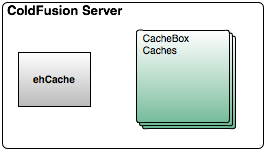
A single instance cache is an in-process cache that can be used within the same JVM heap as your application. In the ColdFusion world, this cache topology is what ColdFusion 9 actually offers: An instance of ehCache that spawns the entire JVM of the running ColdFusion server. There are pros and cons to each topology and you must evaluate the risks and benefits involved with each approach.
Definitely having a single instance approach is the easiest to setup and use. However, if you need to add more ColdFusion instances or you need to cluster your system, single instance will not be of much use anymore as servers will not be synchronized with the same cached data. CacheBox also allows you to create as many instances of itself as you need and also as many CacheBox caches as you need. This allows you great flexibility to create and configure multiple instance caches in a single ColdFusion server instance. This way if you are in shared hosting you do not have to worry about the underlying cache configuration (which is only 1), but you can configure your caching engines for your application ONLY! This is of great benefit and greater flexibility than dealing with a single cache instance on the ColdFusion server.
Benefits:
Fast access to data as it leaves in the same processes
Easy to setup and configure
One easy configuration if you are using ColdFusion 11 or Lucee
Cons:
Shared resources in a single application server
Shared JVM heap size, thus available RAM
Limited scalability
Overview
What is CacheBox?
Features at a Glance
Cache Aggregator
CacheBox Events
CacheBox's aggregation functionality offers a wide gamut of life cycle events that are announced at certain points in execution time. Below are the current events announced by the CacheBox CacheFactory. Remember, this is the CacheFactory and not a CacheBox Cache Provider.
<---  Marking a component as NOT serializable --->
<cfcomponent output="false" serializable="false">

</cfcomponent>

<---  Marking a property as NOT serializable --->
<cfproperty name="cacheEngine" serializable="false" />
false
true
A ColdFusion 9.0.1 and above implementation
CFColdBoxProvider
true
true
A ColdBox enhanced version of our ColdFusion 9.0.1 cache provider
LuceeProvider
false
true
A ColdBox enhanced version of our Lucee cache provider
LuceeColdBoxProvider
true
true
A ColdBox enhanced version of our Lucee cache provider
MockProvider
true
false
A ColdBox enhanced cache provider that can be used for mocking or testing
The directory path to use to store cached objects under. This can be relative or absolute.
cache: the cahce reference to remove
Called before a removeCache() operation is called on CacheBox
afterCacheRemoval
cache: the cache name
Called after the cache has been removed from CacheBox. You receive only the name of the cache removed.
beforeCacheReplacement
oldCache: the cache reference to replace
newCache: the new cache reference to replace with
Called right before a cache is replaced with another cache in CacheBox.
afterCacheFactoryConfiguration
cacheFactory: A reference to the CacheBox factory created
Called after a CacheBox instance has been created, configured and started up. This is a great interception point for creating cache loaders or on startup scripts.
beforeCacheFactoryShutdown
cacheFactory: A reference to the CacheBox factory created
Called right before the CacheBox instance is shutdown gracefully
afterCacheFactoryShutdown
cacheFactory: A reference to the CacheBox factory created
Called right after the CacheBox instance has been shutdown gracefully
beforeCacheShutdown
cache: A reference to the cache shutdown
Called right before a specific cache provider is shutdown by CacheBox Factory
afterCacheShutdown
cache: A reference to the cache that was shutdown
Called right after a specific cache provider has been shut down by CacheBox Factory and before its removed
Event
Data
Description
afterCacheRegistration
cache: the registered reference
beforeCacheRemoval
URL Variables
Description
expireCache
url.cbox_cacheName
Executes a expireAll() in the cache provider specified by the incoming cache name.
reapCache
url.cbox_cacheName
Executes a reap() in the cache provider specified in the incoming cache name
delCacheEntry
url.cbox_cacheNameurl.cbox_cacheEntry
Deletes the passed in cache entry from the named provider
clearAllEvents
url.cbox_cacheName
Executes a clearAllEvents() in the cache provider specified in the incoming cache name(Must be a ColdBox enabled cache)
clearAllViews
url.cbox_cacheName
Executes a clearAllViews() in the cache provider specified in the incoming cache name(Must be a ColdBox enabled cache)
cacheBoxReapAll
none
Executes a reapAll() via the CacheBox Cache Factory
cacheBoxExpireAll
none
Executes a expireAll() via the CacheBox Cache Factory
gc
none
Executes a suggestion to the JVM to produce a garbage collection
/**
* A cache listener for CacheBox
*/
component{

    /**
    * Listen for cache registrations and load data into the 'bigCache' cache ONLY!
    */
    function afterCacheRegistration(interceptData){
        // Get the registered cache reference from the incoming interception data
        var cache = arguments.interceptData.cache;

        // Only work on the BigCache cache
        if( cache.getName() eq "BigCache" ){

            // Talk to service, get some big data items
            dataItems = service.getBigDataItems();

            //Cache them forever as eternal objects
            cache.setMulti(mapping=dataItems,timeout=0);
        }

    }
}
component{

    function configure(){}

    function beforeCacheFactoryShutdown(event, interceptData, buffer){
        // get factory reference.
        var cacheFactory = arguments.interceptData.cacheFactory;
        // Do my stuff here:

        // I can use a log object because ColdBox is cool and injects one for me already.
        log.info("DUDE, I am going down!!!");
    }

    function afterCacheElementRemoved(event, interceptData, buffer){
        var cache = arguments.interceptData.cache;
        var key = arguments.interceptData.cacheObjectKey;

        log.info("The cache #cache.getName()# just removed the key -> #key#");
    }
}
component{

    function configure(cacheBox,properties){
        variables.cacheBox = arguments.cacheBox;
        variables.properties = arguments.properties;

        log = variables.cacheBox.getLogBox().getLogger( this );
    }

    function beforeCacheFactoryShutdown(interceptData){
        // Do your stuff here.
    }

    function afterCacheElementRemoved(interceptData){
        var cache = arguments.interceptData.cache;
        var key = arguments.interceptData.cacheObjectKey;

        log.info("The cache #cache.getName()# just removed the key -> #key#");
    }
}
GET monitor.cfm?cbox_command=gc
GET monitor.cfm?cbox_command=cacheBoxReapAll
GET monitor.cfm?cbox_command=delCacheEntry&cbox_cacheName=default&cbox_cacheEntry=testKey
You can also have multiple CacheBox caching providers running on one machine (Greater Flexibility)
You can also have multiple CacheBox instances running on one machine or have a shared scope instance (Greater Flexibility)
Each of your applications, whether ColdBox or not, can leverage CacheBox and create and configure caches (Greater Flexibility)
Not fault tolerant
Ability to aggregate different caching engines
Ability to aggregate different configurations of the same caches
Rich aggregation event model
Granular logging
Fast and Simple to use
Fast ColdFusion and Java hybrid cache
Simple API and configuration parameters
Small Footprint
There is no need to create it, configure it, or manage it if used within a ColdBox Application.
Memory Management & Memory Sensitive Caching based on
High Load Tested
Fully Documented
Extensible & Flexible
Cache Listeners for event broadcasting
Create custom eviction policies
Create cache providers
Create your own CacheBox object storage
Extensive and granular purging mechanisms (regular expressions and key snippets)
Highly Configurable
JVM Threshold Checks
Object Limits
Ability to time expire objects
Eternal (singletons) and time-lived objects
Object purging based on object usage (Access Timeouts)
Fully configurable at runtime via dynamic configurations and hot-updates
Visually Appealing and Useful
Fully featured caching monitor and commands panel
Complete cache performance reports
Cache Aggregator
CacheBox is a cache aggregator in which you can aggregate different caching engines or types of the same engine into one umbrella. It gives you built-in logging (via LogBox), an event model, synchronization, shutdown/startup procedures, reporting, interaction consoles, and a cache-agnostic API.
CacheBox Aggregation of Caches
CacheBox allows you to manage and create custom, what we call Cache Providers, that talk to different caching engines that you would like to configure in your applications. By aggregating them within CacheBox, you benefit from a rich event model for all caches to share, report, and debug.
Caching API
These cache providers also share the same interaction API and thus give you an excellent level of abstraction, higher extensibility, and flexibility when planning your applications or trying to scale them out.
CacheBox API Providers
You can build your applications based on this abstract API and then be able to configure the caches for your applications at runtime. This gives you greater flexibility and scalability when planning and writing your applications, as they can be targeted for ANY CFML engine or version.
Enterprise Caching Engine
Caching has been a central concern in the ColdBox Platform since its first version. We have always been concerned with mission-critical applications, scalability, and the ability to provide granular caching aspects to ColdFusion (CFML) applications within a single in-process caching engine with different storage capabilities that could be in-process or distributed.
CacheBox Engine Architecture
Foremost, CacheBox behaves as an in-memory cache designed for objects, data, HTML fragments, or anything else you like. It has various tuning parameters such as default object timeout, default last access timeout, maximum objects in the cache, a JVM memory threshold, a reaping frequency, eviction policies, an event model, and so much more.
We also use object stores for the CacheBox caching engine. This means that CacheBox can be configured to store its cached objects in different locations other than memory. This gives us great flexibility because we offer a wide gamut of storage options, plus the concept of actually building your storage.
Cache Debugger & Reporter
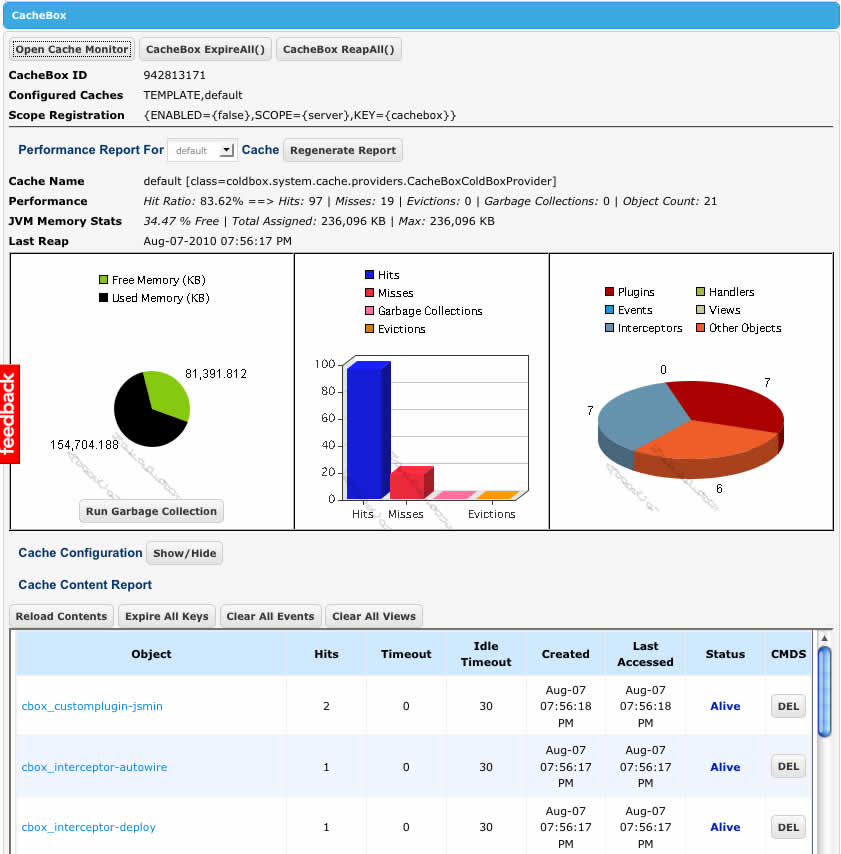
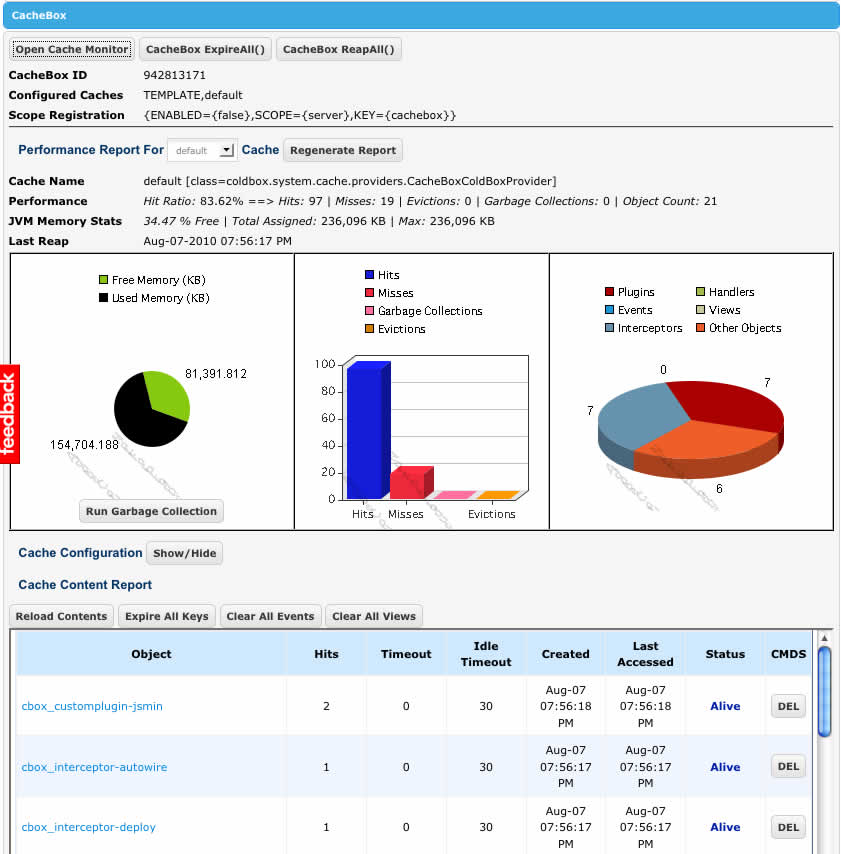
We have an excellent cache debugger where you can visualize all your configured caches from within your application. You can see the performance of the cache the contents, and even issue commands to the targeted cache provider.
CacheBox comes with great reporting tools whether you are using it within a ColdBox application or standalone. This section deals with how to do a-la-carte reporting by using the custom tags that CacheBox ships with. Below is the simplest form of usage for the monitor reporting tags:
That's it! You basically import the tag library from /cachebox/system/cache/report and then use the monitor tag to render out the monitor. What's cool about the monitor is that it is completely skinnable. Please see the CacheBox Report Skins for more information.
Reporting Attributes
Let's check out the attributes for this custom tag:
Info Each skin can implement its own attributes, so always check the skins documentation to see what extra attributes it implements.
Here are some examples of the tag usage:
Creating CacheBox
CacheBox is the core framework you need to instantiate in order to work with caching in your application. You can instantiate it with a CacheBoxConfig object that will hold all of your caching configurations. To configure the library you can either do it programmatically or via a struct/data DSL, the choice is yours. After the library is instantiated and configured you can ask from it a named cache provider, or interact with the caches. By default, CacheBox can be started with no configuration and it will configure itself with the default configuration that is shipped with CacheBox that can be found in the following location:
The default configuration is the following:
If you are using CacheBox within a ColdBox application you do not need to worry about creating or even configuring the framework, as ColdBox ships already with a default configuration for ColdBox applications. However, you also have full control of configuring CacheBox at your application level (Please see the ColdBox application configuration section). The default configuration for a ColdBox application can be found in the following location:
Modes of Operation
In summary, CacheBox has two modes of operation:
Standalone Framework
ColdBox Application
If you have downloaded CacheBox as a standalone framework, then please make sure you use the correct namespace path (cachebox.system). Also, once you create CacheBox make sure that you persist it somewhere, either in Application scope or any other scope or a dependency injection context (WireBox). ColdBox application users already have an instance of CacheBox created for you in every application and it is stored in the main application controller and can be retrieved via the following function:
Info Note: Most of the examples shown in this documentation refer the default framework namespace of coldbox.system. However, if you are using CacheBox as a standalone framework, then the namespace to use is cachebox.system. Happy Coding!
Creating CacheBox Examples
Let's start with the simplest example of them all which is just creating CacheBox with the default configuration. The rest of the samples show different configuration options:
Here are some more configuration samples:
ReportHandler
This object is in charge of rendering skin templates and also executing processing commands. The custom tag creates this object and prepares it for usage, so do not worry about it, just know how to use it. The following are the variable compositions this object has and therefore you can use them in your skin templates:
Variable
Type
Description
cacheBox
cachebox.system.cache.CacheFactory
A reference to the running CacheBox cache factory
baseURL
string
This tag also has the following methods that you might be interested in:
For example, here is a snippet of the CachePanel.cfm template to designate where the cache report for a specific cache provider will be rendered by default:
Since no cacheName argument is provided, it will use the default value of default. Here is a snippet of the cache report template of where it designates the content report to be rendered. It also verifies that the cache provider has reporting enabled and uses a custom attribute called contentReport.
Using Your Own Policy
CacheBox is incredibly flexible and if you would like to create your own eviction policy, you can! Below are a set of easy steps on how to do this:
Create a simple CFC that implements the following class cachebox.system.cache.policies.IEvictionPolicy or use our convenience abstract class and inherit from cachebox.system.cache.policies.AbstractEvictionPolicy
Create your own
<cfimport prefix="cachebox" taglib="/cachebox/system/cache/report">

<---  Create CacheBox with default configuration --->
<cfif structKeyExists(url,"reinit") OR NOT structKeyExists(application,"cacheBox")>
    <cfset application.cacheBox   = new cachebox.system.cache.CacheFactory()>
<cfelse>
    <cfset cachebox = application.cacheBox>
</cfif>

<cfoutput>
<html>

    <head>
        <title>CacheBox Monitor Tool</title>
    </head>
    <body>

    <---  Special ToolBar --->
    <div id="toolbar">
        <input type="button" value="Reinit" onclick="window.location='index.cfm?reinit'"/>
    </div>

    <---  Render Report Here --->
    <cachebox:monitor cacheFactory="#cacheBox#"/>

    </body>
</html>
</cfoutput>
function configure(){
    // The CacheBox configuration structure DSL
    cacheBox = {
        // LogBox Configuration file
        logBoxConfig = "cachebox.system.cache.config.LogBox",

        // Scope registration, automatically register the cachebox factory instance on any CF scope
        // By default it registers itself on application scope
        scopeRegistration = {
            enabled = true,
            scope   = "application", // valid CF scope
            key     = "cacheBox"
        },

        // The defaultCache has an implicit name of "default" which is a reserved cache name
        // It also has a default provider of cachebox which cannot be changed.
        // All timeouts are in minutes
        // Please note that each object store could have more configuration properties
        defaultCache = {
            objectDefaultTimeout = 120,
            objectDefaultLastAccessTimeout = 30,
            useLastAccessTimeouts = true,
            reapFrequency = 2,
            freeMemoryPercentageThreshold = 0,
            evictionPolicy = "LRU",
            evictCount = 1,
            maxObjects = 300,
            // Our default store is the concurrent soft reference
            objectStore = "ConcurrentSoftReferenceStore",
            // This switches the internal provider from normal cacheBox to coldbox enabled cachebox
            coldboxEnabled = false
        },

        // Register all the custom named caches you like here
        caches = {},
        // Register all event listeners here, they are created in the specified order
        listeners = []
    };
}
/coldbox/system/web/config/CacheBox.cfc
The baseURL attribute passed via the tag configuration
sking
string
The skin attribute passed via the tag configuration
skinPath
string
The non-expanded path to the skin in use. e.g. /cachebox/system/cache/report/skin/MyCoolSkin
attributes
struct
A reference to the attributes structure passed via the tag
caller
template
A reference to the caller page of the custom tag.
Return Type
Method
void
processCommands(*[command=],[cacheName=default],[cacheEntry=])
Execute and process a cacheBox command
any
renderCachePanel()
Render the CachePanel.cfm template
any
renderCacheReport(cacheName)
Render the CacheReport.cfm template which renders typically the report information about a specific cache provider
any
renderCacheContentReport(cacheName)
Render the CacheContentReport.cfm template which typically renders the report of the content of the cache provider
any
renderCacheDumper(cacheName,cacheEntry)
Tries to retrieve the cacheEntry from the cacheName provider and dumps it
execute()
method that will evict items (We recommend looking at existing policies to get an insight on how to do this)
Use the policy instantiation path in your cachebox provider properties
Sample Policy
Process Evictions:
The below code is the code used to evict objects from cache
Configuration File
That's it folks! Very easily you can create your own eviction policies and use our built in indexers to just sort the elements in whatever way you like. If not, you can always do it yourself :)
// Get a reference to CacheBox
controller.getCacheBox();

// Get a reference to the default cache provider
controller.getCache() or getCache()

// Get a reference to a named cache provider
controller.getCache("template") or getCache("template")
import cachebox.system.cache.*;

// create cachebox
cachebox = new CacheFactory();
// get the default cache
cache = cachebox.getDefaultCache();
// set a value in cache, with 60 minute timeout and 20 minute idle timeout.
cache.set("MyValue", {name="Luis Majano", awesome=true, cacheWeirdo=true}, 60,20);
// Create CacheBox with default configuration
cacheBox = new cachebox.system.cache.CacheFactory( );


// Create CacheBox instance
cacheBox = new cachebox.system.cache.CacheFactory( config );

// Create the config object as a CacheBox DSL Simple CFC
dataCFC = new MyCacheBoxConfig();
config = new cachebox.system.cache.config.CacheBoxConfig( CFCConfig=dataCFC );
// Create CacheBox instance
cacheBox = new cachebox.system.cache.CacheFactory( config );


// Create the config object as a CacheBox DSL Simple CFC path only
config = new cachebox.system.cache.config.CacheBoxConfig( CFCConfigPath="MyCacheBoxConfig" );
// Create CacheBox instance
cacheBox = new cachebox.system.cache.CacheFactory( config );

// Create CacheBoxConfig, call configuration methods on it and then create the factory
config = new cachebox.system.cache.config.CacheBoxConfig();
// Configure programmatically: You can chain methods, woot!
config.scopeRegistration( true, "application" )
    .defaultCache( objectStore="DiskStore", maxObject=200 );
// Create CacheBox instance
cacheBox = new cachebox.system.cache.CacheFactory( config );
<---  Named Cache Report --->
<div id="fw_cacheReport">#renderCacheReport()#</div>
<---  Content Report --->
<cfif cacheProvider.isReportingEnabled() AND attributes.contentReport>
    <h3>Cache Content Report</h3>

    <---  Reload Contents --->
    <input type="button" value="Reload Contents"
           name="cboxbutton_reloadContents"
           style="font-size:10px"
           title="Reload the contents"
           onClick="fw_cacheContentReport('#URLBase#','#arguments.cacheName#')" />

    <---  Expire All Keys --->
    <input type="button" value="Expire All Keys"
           name="cboxbutton_expirekeys" id="cboxbutton_expirekeys"
           style="font-size:10px"
           title="Expire all the keys in the cache"
           onclick="fw_cacheContentCommand('#URLBase#','expirecache', '#arguments.cacheName#')" />

    <---  ColdBox Application Commands --->
    <cfif cacheBox.isColdBoxLinked()>
        <---  Clear All Events --->
        <input type="button" value="Clear All Events"
               name="cboxbutton_clearallevents" id="cboxbutton_clearallevents"
               style="font-size:10px"
               title="Remove all the events in the cache"
               onclick="fw_cacheContentCommand('#URLBase#','clearallevents', '#arguments.cacheName#')" />
        <---  Clear All Views --->
        <input type="button" value="Clear All Views"
               name="cboxbutton_clearallviews" id="cboxbutton_clearallviews"
               style="font-size:10px"
               title="Remove all the views in the cache"
               onclick="fw_cacheContentCommand('#URLBase#','clearallviews', '#arguments.cacheName#')" />
    </cfif>

    <---  Loader --->
    <span class="fw_redText fw_debugContent" id="fw_cacheContentReport_loader">Please Wait, Processing...</span>

    <div class="fw_cacheContentReport" id="fw_cacheContentReport">
        #renderCacheContentReport(arguments.cacheName)#
    </div>
</cfif>
/**
* FIFO Eviction Policy Command
*/
component extends="cachebox.system.cache.policies.AbstractEvictionPolicy"{

    /**
    * Constructor
    * @cacheProvider The associated cache provider of type: cachebox.system.cache.ICacheProvider
    */
    FIFO function init( required cacheProvider ){
        super.init( arguments.cacheProvider );

        return this;
    }

    /**
    * Execute the policy
    */
    function execute(){
        var index       = "";

        // Get searchable index
        try{
            index = getAssociatedCache()
                .getObjectStore()
                .getIndexer()
                .getSortedKeys( "hits", "numeric", "asc" );

            // process evictions via the abstract class
            processEvictions( index );
        }
        catch(Any e){
            getLogger().error("Error sorting via store indexer #e.message# #e.detail# #e.stackTrace#.");
        }
    }

}
<---  processEvictions --->
<cffunction name="processEvictions" output="false" access="private" returntype="void" hint="Abstract processing of evictions">
    <cfargument name="index" type="array" required="true" hint="The array of metadata keys used for processing evictions"/>
    <cfscript>
        var oCacheManager   = getAssociatedCache();
        var indexer         = oCacheManager.getObjectStore().getIndexer();
        var indexLength     = arrayLen(arguments.index);
        var x               = 1;
        var md              = "";
        var evictCount      = oCacheManager.getConfiguration().evictCount;
        var evictedCounter  = 0;

        //Loop Through Metadata
        for (x=1; x lte indexLength; x=x+1){

            // verify object in indexer
            if( NOT indexer.objectExists( arguments.index[x] ) ){
                continue;
            }
            md = indexer.getObjectMetadata( arguments.index[x] );

            // Evict if not already marked for eviction or an eternal object.
            if( md.timeout gt 0 AND NOT md.isExpired ){

                // Expire Object
                oCacheManager.expireKey( arguments.index[x] );

                // Record Eviction
                oCacheManager.getStats().evictionHit();
                evictedCounter++;

                // Can we break or keep on evicting
                if( evictedCounter GTE evictCount ){
                    break;
                }
            }
        }//end for loop
    </cfscript>
</cffunction>
CacheBox comes pre-configured for operation for caching using a default cache. However, you can customize CacheBox using different strategies by levarging the CacheBox Configuration DSL.
When you are in a ColdBox application, you will have a cachebox structure in your ColdBox.cfc already that you can use, or you can create a portable CFC as well and place it in config/CacheBox.cfc
The cool thing about this CacheBox DSL is that it is the same whether you are using CacheBox in ColdBox applications or any other framework or non-framework ColdFusion application.
Configuration can be done in the following ways:
No configuration: Uses the default configuration shown below
Portable CFC: Creating a portable data CFC using the CacheBox DSL in a configure() method
Programmatic Config: Creating the CacheBoxConfig
1. Default Configuration
This is the default configuration when CacheBox is created with no config. CacheBox will
Use a default LogBox configuration to the console
Register CacheBox in the CFML application scope as cachebox
Create a defaultcache
2. Portable CFC
You can create a CFC with a single configure method with the CacheBox configuration in a variable called cachebox using the CacheBox DSL.
3. Programmatic Config
You can create an instance of the cachebox.system.cache.config.CacheBoxConfig and calling methods on it.
4. Struct Literal Config
You can also use a struct literal to configure CacheBox
Default Cache
The defaultCache element is in itself a structure of configuration data for the default cache provider of type cachebox.system.cache.providers.CacheBoxProvider. This is a reserved cache name and it is MANDATORY to declare and its name or type cannot be changed.
However, if you are using CacheBox within a ColdBox application, the provider will switch itself to cachebox.system.cache.providers.CacheBoxColdBoxProvider by using the coldboxEnabled key. So let's see the configuration keys for our default cache.
Default Cache Properties:
Eviction Policies
LFU (Least Frequently Used)
LRU (Least Recently Used)
FIFO (First In First Out)
Object Stores
ConcurrentStore - Uses concurrent hashmaps for increased performance
ConcurrentSoftReferenceStore - Concurrent hashmaps plus java soft references for JVM memory sensitivity
DiskStore - Uses a physical disk location for caching (Uses java serialization for complex objects)
Caution : Please note that each object store could have more configuration properties that you will need to add to the configuration structure. To find out about these extra configuration properties, please see the Object Store's section.
Example:
CacheBox Provider
The CacheBox provider is our very own enterprise cache implementation that has been part of the core since its initial baby step versions. Our caching engine has matured over the years and it has been proven effective, fast, scalable and very user friendly. Here are the two implementations for our CacheBox provider:
CacheBoxProvider : Our base CacheBox provider caching engine
CacheBoxColdBoxProvider
CF Providers
Our CFColdboxProvider is an implementation specifically written for Adobe ColdFusion 11 and beyond. This provider leverages the engine within ColdFusion 11 and extends the native ColdFusion capabilities by talking to the sessions natively via Java. In this manner we are able to do things like:
The delay in minutes to produce a cache reap (Not guaranteed)
FreeMemoryPercentageThreshold
numeric
false
0
The numerical percentage threshold of free JVM memory to have available before caching. If the JVM free memory falls below this setting, the cache will run the eviction policies in order to cache new objects. (0=Unlimited)
MaxObjects
numeric
false
200
The maximum number of objects for the cache
EvictionPolicy
string or path
false
LRU
The eviction policy algorithm class to use.
EvictCount
numeric
false
1
The number of objects to evict once an execution of the policy is requested. You can increase this to make your evictions more aggressive
objectStore
string
false
ConcurrentStore
The object store to use for caching objects.
ColdBoxEnabled
Boolean
false
false
A flag that switches on/off the usage of either a plain vanilla CacheBox provider or a ColdBox enhanced provider. This must be true when used within a ColdBox application and it applies for the default cache ONLY.
resetTimeoutOnAccess
boolean
false
false
If true, then when cached objects are retrieved their timeout will be reset to its original value and thus elongating the survival strategy of the items. Much how session storages work.
Custom: You can also build your own and pass the instantiation path in this setting
JDBCStore - Uses a JDBC datasource for caching (Uses java serialization for complex objects)
Custom : You can also build your own and pass the instantiation path in this setting.
Key
Type
Required
Default
Description
ObjectDefaultTimeout
numeric
false
60
The default lifespan of an object in minutes
ObjectDefaultLastAccessTimeout
numeric
false
30
The default last access or idle timeout in minutes
/**
 * Copyright Since 2005 ColdBox Framework by Luis Majano and Ortus Solutions, Corp
 * www.ortussolutions.com
 * ----
 * The default ColdBox CacheBox configuration object that is used when the cache factory is created by itself
 **/
component {

/**
 * Configure CacheBox, that's it!
 */
function configure(){
    // The CacheBox configuration structure DSL
    cacheBox = {
	// LogBox Configuration file
	logBoxConfig      : "coldbox.system.cache.config.LogBox",
	// Scope registration, automatically register the cachebox factory instance on any CF scope
	// By default it registers itself on server scope
	scopeRegistration : {
		enabled : true,
		scope   : "application", // the cf scope you want
		key     : "cacheBox"
	},
	// The defaultCache has an implicit name of "default" which is a reserved cache name
	// It also has a default provider of cachebox which cannot be changed.
	// All timeouts are in minutes
	// Please note that each object store could have more configuration properties
	defaultCache : {
		objectDefaultTimeout           : 120,
		objectDefaultLastAccessTimeout : 30,
		useLastAccessTimeouts          : true,
		reapFrequency                  : 2,
		freeMemoryPercentageThreshold  : 0,
		evictionPolicy                 : "LRU",
		evictCount                     : 1,
		maxObjects                     : 300,
		objectStore                    : "ConcurrentSoftReferenceStore",
		// This switches the internal provider from normal cacheBox to coldbox enabled cachebox
		coldboxEnabled                 : false
	},
	// Register all the custom named caches you like here
	caches    : {},
	// Register all event listeners here, they are created in the specified order
	listeners : [
		 // { class="", name="", properties={} }
	]
    };
}

}
component{
/**
 * Configure CacheBox for ColdBox Application Operation
 */
function configure(){
    // The CacheBox configuration structure DSL
    cacheBox = {
	// LogBox config already in coldbox app, not needed
	// logBoxConfig = "coldbox.system.web.config.LogBox",

	// The defaultCache has an implicit name "default" which is a reserved cache name
	// It also has a default provider of cachebox which cannot be changed.
	// All timeouts are in minutes
	defaultCache : {
		objectDefaultTimeout           : 120, // two hours default
		objectDefaultLastAccessTimeout : 30, // 30 minutes idle time
		useLastAccessTimeouts          : true,
		reapFrequency                  : 5,
		freeMemoryPercentageThreshold  : 0,
		evictionPolicy                 : "LRU",
		evictCount                     : 1,
		maxObjects                     : 300,
		objectStore                    : "ConcurrentStore", // guaranteed objects
		coldboxEnabled                 : true
	},
	// Register all the custom named caches you like here
	caches : {
		// Named cache for all coldbox event and view template caching
		template : {
			provider   : "coldbox.system.cache.providers.CacheBoxColdBoxProvider",
			properties : {
				objectDefaultTimeout           : 120,
				objectDefaultLastAccessTimeout : 30,
				useLastAccessTimeouts          : true,
				freeMemoryPercentageThreshold  : 0,
				reapFrequency                  : 5,
				evictionPolicy                 : "LRU",
				evictCount                     : 2,
				maxObjects                     : 300,
				objectStore                    : "ConcurrentSoftReferenceStore" // memory sensitive
			}
		}
	}
    };

    // Add caches per engine
    if ( listFindNoCase( "Lucee", server.coldfusion.productname ) ) {
	cachebox.caches.luceeCache = { provider : "coldbox.system.cache.providers.LuceeProvider" };
    } else {
	cachebox.caches.cfCache = { provider : "coldbox.system.cache.providers.CFColdBoxProvider" };
    }
}
}
config = new cachebox.system.cache.config.CacheBoxConfig()
    .scopeRegistration( true )
    .defaultCache( maxObjects : 200, objectStore : "ConcurrentStore" );

new cachebox.system.cache.CacheFactory( config );
new cachebox.system.cache.CacheFactory( {
	// LogBox Configuration file
	logBoxConfig      : "coldbox.system.cache.config.LogBox",
	// Scope registration, automatically register the cachebox factory instance on any CF scope
	// By default it registers itself on server scope
	scopeRegistration : {
		enabled : true,
		scope   : "application", // the cf scope you want
		key     : "cacheBox"
	},
	// The defaultCache has an implicit name of "default" which is a reserved cache name
	// It also has a default provider of cachebox which cannot be changed.
	// All timeouts are in minutes
	// Please note that each object store could have more configuration properties
	defaultCache : {
		objectDefaultTimeout           : 120,
		objectDefaultLastAccessTimeout : 30,
		useLastAccessTimeouts          : true,
		reapFrequency                  : 2,
		freeMemoryPercentageThreshold  : 0,
		evictionPolicy                 : "LRU",
		evictCount                     : 1,
		maxObjects                     : 300,
		objectStore                    : "ConcurrentSoftReferenceStore",
		// This switches the internal provider from normal cacheBox to coldbox enabled cachebox
		coldboxEnabled                 : false
	}
} );
// The CacheBox configuration structure DSL
cacheBox = {
    // Please note that each object store could have more configuration properties
    defaultCache = {
        objectDefaultTimeout = 60,
        objectDefaultLastAccessTimeout = 30,
        useLastAccessTimeouts = true,
        reapFrequency = 2,
        freeMemoryPercentageThreshold = 0,
        evictionPolicy = "LRU",
        evictCount = 1,
        maxObjects = 200,
        // Our default store is the concurrent soft reference
        objectStore = "ConcurrentSoftReferenceStore",
        // This switches the internal provider from normal cacheBox to coldbox enabled cachebox
        coldboxEnabled = false,
        resetTimeoutOnAccess = false
    },
};
: A subclass of
CacheBoxProvider
that enables caching operations for ColdBox applications
Properties
Key
Type
Required
Default
Description
ObjectDefaultTimeout
numeric
false
60
The default lifespan of an object in minutes
ObjectDefaultLastAccessTimeout
numeric
false
30
Eviction Policies
Coldbox ships with the following eviction policies
LRU (Least Recently Used)
LFU (Least Frequently Used)
FIFO (First In First Out)
LIFO (Last In First Out)
Custom: You can also build your own and pass the instantiation path in this setting
Object Stores
ColdBox ships with the following object stores:
ConcurrentStore - Uses concurrent hash maps for increased performance
ConcurrentSoftReferenceStore - Concurrent hash maps plus java soft references for JVM memory sensitivity
DiskStore - Uses a physical disk location for caching (Uses java serialization for complex objects)
JDBCStore - Uses a JDBC datasource for caching (Uses java serialization for complex objects)
Custom : You can also build your own and pass the instantiation path in this setting
Please also note that each of the object stores can have extra configuration properties that you will need to set. So for that, let's delve a little deeper into object stores.
Talk to terracotta classes
Do quiet operations on get, clear, and put
Check if an element is expired
Do reporting and content reporting
Much more
Properties
Each CacheBox provider can have its own set of configuration properties it needs for operation. Our CF providers also have some. Please note, all properties other than "cacheName" are passed through to the underlying EHCache implementation in ColdFusion. The default values may differ if you have edited the ehcache.xml file on your server.
Property
Type
Required
Default
Description
cacheName
string
false
object
The named cache to talk to via ColdFusion cache operations. By default we talk to the default ColdFusion object cache.
clearOnFlush
boolean
false
true
Info Please note that you can configure more than 1 CFColdboxProvider cache engine in your applications that can talk to more than one referenced ColdFusion (EHCache) custom cache.
The default last access or idle timeout in minutes
UseLastAccessTimeouts
Boolean
false
true
Use or not idle timeouts
ReapFrequency
numeric
false
2
The delay in minutes to produce a cache reap (Not guaranteed)
FreeMemoryPercentageThreshold
numeric
false
0
The numerical percentage threshold of free JVM memory to have available before caching. If the JVM free memory falls below this setting, the cache will run the eviction policies in order to cache new objects. (0=Unlimited)
MaxObjects
numeric
false
200
The maximum number of objects for the cache
EvictionPolicy
string or path
false
LRU
The eviction policy algorithm class to use.*
EvictCount
numeric
false
1
The number of objects to evict once an execution of the policy is requested. You can increase this to make your evictions more aggressive
objectStore
string
false
ConcurrentStore
ConcurrentStore The object store to use for caching objects.**
ColdboxEnabled
Boolean
false
false
A flag that switches on/off the usage of either a plain vanilla CacheBox provider or a ColdBox enhanced provider. This must be true when used within a ColdBox application and it applies for the default cache ONLY.
resetTimeoutOnAccess
Boolean
false
false
If true, then when cached objects are retrieved their timeout will be reset to its original value and thus elongating the survival strategy of the items. Much how session storages work.
Sets whether the MemoryStore should be cleared when flush() is called on the cache
diskExpiryThreadIntervalSeconds
integer
false
120 (2 minutes)
The interval in seconds between runs of the disk expiry thread.
diskPersistent
boolean
false
false
Specifies whether to persist caches stored on disk through JVM restarts.
diskSpoolBufferSizeMB
integer
false
30
The size of the disk spool used to buffer writes
external
boolean
false
false
Specifies whether no timeout or idletime applies. A true value indicates that the object or page is cached without any timespan being specified.
maxElementsInMemory
integer
fasle
10000
The maximum number of objects that can be cached in memory. If the number is exceeded and overflowtodisk is false, the new objects entered replace old elements using algorithm specified in the memoryevictionpolicy entry.
maxElementsOnDisk
integer
false
10000000
The maximum number of objects that can be stored on disk if overfllowtodisk is true.
memoryEvictionPolicy
string
false
LRU
The algorithm to used to evict old entries when maximum limit is reached, such as LRU (least recently used) or LFU (least frequently used).
overflowToDisk
boolean
false
false
Specifies whether when the maximum number of elements allowed in memory is reached, objects can be moved to disk, as determined by the memoryevictionpolicy value.
timeToIdleSeconds
integer
false
86400
The idle time in seconds. Used if a cfcache tag does not specify an idleTime attribute.
timeToLiveSeconds
integer
false
86400
The timeout time in seconds. Used if a cfcache tag does not specify a timespan attribute.
CacheBox DSL
As we have seen, the CacheBox DSL can be used in different contexts:
Portable CFC with a configure() method in a cachebox variable
ColdBox config inside the configure() method in a cachebox variable
A struct literal is sent into the constructor of CacheBox
No matter how you dice it, it's the same CacheBox Config DSL:
Base Config
The cacheBox structure can be configured with the following keys:
LogBoxConfig
The LogBoxConfig element is used only in a standalone mode of operation and tells CacheBox what configuration file to load into LogBox.
is an enterprise ColdFusion (CFML) logging library
By default, CacheBox will instantiate LogBox with its default configuration file located at: cachebox.system.cache.config.LogBox.cfc which logs to the console.
Scope Registration
This configuration allows CacheBox to be placed automatically upon construction in your specified scope. By default, CacheBox registers itself in application scope with a key of cachebox
DefaultCache
Every CacheBox instance has a default cache that can be configured as you like. Above you can see the default configuration for the cache.
This is a reserved cache name, and it is MANDATORY to declare, and its name or provider type cannot be changed.
However, if you are using CacheBox within a ColdBox application, the provider will switch itself to cachebox.system.cache.providers.CacheBoxColdBoxProvider by using the coldboxEnabled key.
objectDefaultTimeout : numeric
The default lifespan of an object is in minutes. This is how long an object lives within the cache. If this value is 0 then all objects will be eternal, meaning they will live forever.
objectDefaultLastAccessTimeout : numeric
The default last access or idle timeout in minutes. If an object has not been accessed within this time limit since the last access, then it will be marked for purging.
useLastAccessTimeouts : boolean
By default, the last access timeout is enabled. You can disable this purging feature if you desire.
resetTimeoutOnAccess : boolean
If true, then when cached objects are retrieved their timeout will be reset to its original value thus elongating the survival strategy of the items. Much how session storages work on JEE. The default is false, meaning the timeout will NOT be reset on each access.
reapFrequency : numeric
Every CacheBox provider has its own executor service with a reaping task executing under this frequency. This is how often the cache is inspected to purge old/invalid keys.
freeMemoryPercentageThreshold : numeric
The numerical percentage threshold of free JVM memory to be available before caching. If the JVM free memory falls below this setting, the cache will run the eviction policies to cache new objects. If you set this value to be 0 , there will be no free memory checks.
evictionPolicy : string
The eviction policy algorithm to use. The available algorithms are:
LFU
LRU - Default
LIFO
evictCount : numeric
The number of objects to evict once an execution of the policy is requested. You can increase this to make your evictions more aggressive. By default, one object is purged from the cache. However, you can increase it to purge more than one as needed.
maxObjects : numeric
The maximum number of objects the cache can have, give or take, expired objects. Once a limit is reached, the cache will start purging objects using the eviction policy and counts. The default is 300.
coldboxEnabled : boolean
A flag that switches on/off the usage of either a plain vanilla CacheBox provider or a ColdBox enhanced provider. This must be true when used within a ColdBox application and applies to the default cache ONLY. For standalone mode, ignore this or always set it to false.
objectStore : string
Each CacheBox provider can have a strategy of where to store the objects. These are called object stores. The value here is the name of the store. By , we use the ConcurrentSoftReferenceStore.
Store
Description
Eviction Policies
,LFU (Least Frequently Used)
LRU (Least Recently Used)
FIFO (First In First Out)
Object Stores
ConcurrentStore - Uses concurrent hashmaps for increased performance
ConcurrentSoftReferenceStore - Concurrent hashmaps plus java soft references for JVM memory sensitivity
DiskStore - Uses a physical disk location for caching (Uses java serialization for complex objects)
Caution : Please note that each object store could have more configuration properties that you will need to add to the configuration structure. To find out about these extra configuration properties, please see the Object Store's section.
Example:
Caches
The caches element is a configuration data structure for aggregating named cache providers of ANY type. The key is the unique name of the cache to aggregate under this CacheBox instance. Each provider has unique , so explore them as well.
Listeners
CacheBox has an where you can listen to cache operations and cache factory operations. You do so with listener CFCs that you register in your config, mostly for standalone operation. In ColdBox, all interceptors have access to all events.
Caution: Please note that the order of declaration is the same as the order of execution, so it matters, just like ColdBox Interceptors. Using CacheBox within a ColdBox application, you can also register listeners as interceptors in your ColdBox configuration file.
A structure where you can create more named caches for usage in your CacheBox factory.
listeners
false
An array that will hold all the listeners you want to configure at startup time for your CacheBox instance. If you are running CacheBox within a ColdBox application, this item is not necessary as you can register them via the main ColdBox interceptors section.
key
string
false
cachebox
The name of the key in the ColdFusion scope to persist on
FIFO
Custom
You can build your own storage
Custom: You can also build your own and pass the instantiation path in this setting
JDBCStore - Uses a JDBC datasource for caching (Uses java serialization for complex objects)
Custom : You can also build your own and pass the instantiation path in this setting.
Key
Required
Description
logBoxConfig
false
The instantiation or location of a LogBox configuration file. This is only for standalone operations.
scopeRegistration
false
A structure that enables scope registration of the CacheBox factory in either server, cluster, application, or session scope.
defaultCache
true
The configuration of the default cache which will have an implicit name of default which is a reserved cache name. It also has a default provider of CacheBox which cannot be changed.
Objects are kept in a concurrent hashmap but wrapped in a Java SoftReference object, which can sense the JVM's memory. Meaning it can auto-reap if the JVM desires it.
The path of the cache that must implement our ICacheProvider interface.
properties
struct
A structure of name-value pairs of configuration data for the cache to declare.
Key
Type
Description
class
path
The instantiation path of the listener object to register
name
string
The unique name is used for this listener for registration purposes. If no name is provided, we will use the last part of the instantiation path, usually the filename.
properties
struct
A structure of name-value pairs of configuration data for the listener declared.
// The defaultCache has an implicit name of "default" which is a reserved cache name
// It also has a default provider of cachebox which cannot be changed.
// All timeouts are in minutes
// Please note that each object store could have more configuration properties
defaultCache : {
	objectDefaultTimeout           : 120,
	objectDefaultLastAccessTimeout : 30,
	useLastAccessTimeouts          : true,
	reapFrequency                  : 2,
	freeMemoryPercentageThreshold  : 0,
	evictionPolicy                 : "LRU",
	evictCount                     : 1,
	maxObjects                     : 300,
	objectStore                    : "ConcurrentSoftReferenceStore",
	// This switches the internal provider from normal cacheBox to coldbox enabled cachebox
	coldboxEnabled                 : false
},
// Register all the custom-named caches you like here
caches = {
    sampleCache1 = {
        provider="cachebox.system.cache.providers.CacheBoxProvider",
        properties = {
            objectDefaultTimeout="20",
            useLastAccessTimeouts="false",
            reapFrequency="1",
            evictionPolicy="LFU",
            evictCount="1",
            maxObjects="100",
            objectStore="ConcurrentSoftReferenceStore"
        }
    },
    sampleCache2 = {
        provider = "cachebox.system.cache.providers.CFColdboxProvider"
    }
},
{
    // The path to the listener
    class="path.to.CFC",
    // A unique name for the listener
    name="UniqueName",
    // A structure of name-value pairs for configuring this interceptor
    properties = {}
}
{ class="Timer", name="CoolTimer" }